In this article
Metafields and Metaobjects Setup
The following Shopify settings are not required to establish the base connection between Shopify and LS Central. Configure them only if you plan to use the related features - for example, translating product content into multiple languages, mapping regional pricing through markets, or syncing custom fields using metafields and metaobjects.
Languages (Locale) Setup
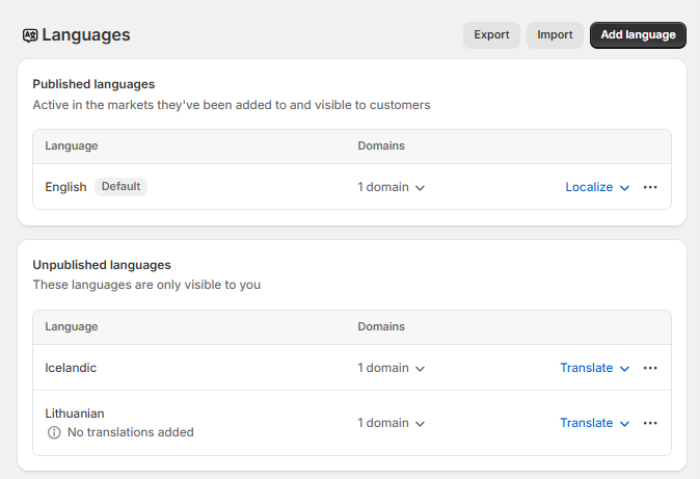
Before enabling language synchronization between LS Central and Shopify, the necessary languages must first be configured in your Shopify store. Configure this setting only if you plan to use data translation. Once set up, this ensures LS Central can retrieve the available locale codes and send translated content correctly to Shopify.
Path: Settings - Languages
- Go to your Shopify Admin.
- Navigate to Settings - Languages.
- Add or publish the languages you intend to use.
For more details, see Data Translation.
Markets Setup
Before retrieving Shopify price lists into the Mapping Price Lists page in LS Central, the markets must first be set up in the Shopify Admin. After that, create a catalog and assign it to a specific market, so the products in that catalog are available to customers within that market.
Path: Markets, then Catalogs
- Go to your Shopify Admin.
- Navigate to Markets and click Create Market.
- Navigate to Catalogs and click Create Catalog.


Note: To ensure pricing accuracy between Shopify and LS Central, disable the price rounding option.
For more details, see Market Support.
Metafields and Metaobjects Setup
Metafields let you attach extra data to Shopify's standard product and customer records - values that don't have a dedicated field in Shopify, such as custom attributes coming from LS Central. Configure these only if you need to send or receive product or customer data beyond Shopify's default fields.
For more details, see Metafields.
See also
Shopify - Required Configuration