In this article
Paying a pharmacy order in the POS
How multiple payment lines are used
Customers often pay only part of the price of prescription items. An insurer or a reimbursement scheme pays the rest. Customer Order for Pharmacy tracks this split and applies it when the order is paid and collected in the POS. This is an addition to the standard payment and deposit handling for customer orders. See POS Functionality for how customer order payments and prepayments normally work.
Insurance handling only applies when the Insurance for CO field is turned on in the Customer Order Setup page. See Pharmacy FastTab.
Paying a pharmacy order in the POS
When you pay or collect an RX order in the POS and the order has an insurance amount, the amount that remains to be collected from the customer is adjusted so that the part covered by insurance is not charged again. The system compares what has already been paid with the prepayment amount of the order plus any amount on the same transaction that is not part of the customer order, minus the insurance amount. Depending on whether the amount already covers what is due, it then does one of these:
- Treats the payment as complete.
- Asks whether to add the extra amount as prepayment toward the customer order.
- Shows the outstanding prepayment balance that is still due.
This happens automatically. You only need to turn on Insurance for CO.
The insurance payment line
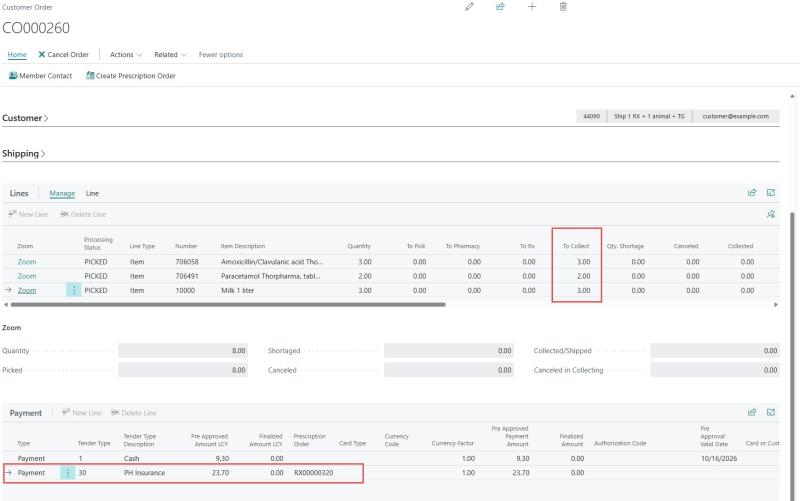
When the calculated insurance payment of a linked prescription is greater than zero, a customer order payment line for that amount is created automatically with the tender type in Insurance Tender Type in the setup. You do not add this line manually.
The line is created when the pharmacist finishes an approved prescription that is linked to a customer order, and only if the order is a ship order, that is, an order that is delivered from a warehouse through a sales order.
For a click and collect order, the line is not created. The insurance amount instead reaches the POS together with the other prescription data when the order lines are collected into the POS transaction. A ship order has no such collection step. It is invoiced when the sales order is posted, so the customer order payment line is what carries the insurance amount into the posting.
How multiple payment lines are used
A customer order can have more than one payment line, for example the payment from the customer together with the insurance payment line. When the order is finalized, for example when the authorized payments of an eCommerce order are captured or a ship order is posted, the system uses the payment lines one by one until the amount of the order is covered. The order is set automatically when each payment line is added, and you cannot change it. In practice, the insurance amount is always used before the payment from the customer.
See also