In this article
Architecture with bc2adls (recommended)
Analytics for LS Central turns your LS Central data into ready-made Power BI reports, without the work of building your own data warehouse.
Analytics is built by LS Retail on Power BI, Microsoft's cloud business intelligence service. You get reporting-ready data and a full set of Power BI reports with advanced calculations built in.
The recommended way to use Analytics is with bc2adls. The bc2adls app exports your LS Central SaaS data to Azure, and Analytics turns it into reports. It is the option we are actively developing, and it works with LS Central SaaS version 27.0 and later.
To get started, register for a license through the LS Retail License department. You can then download the product package free of charge. For a high-level overview or to request a demo, visit LSRetail.com.
Architecture with bc2adls (recommended)
Data flows from left to right in the image below. This setup is designed for:
-
LS Central SaaS environments
-
Modern Azure and Fabric-based Analytics scenarios
-
Ongoing improvements to the data warehouse and reports
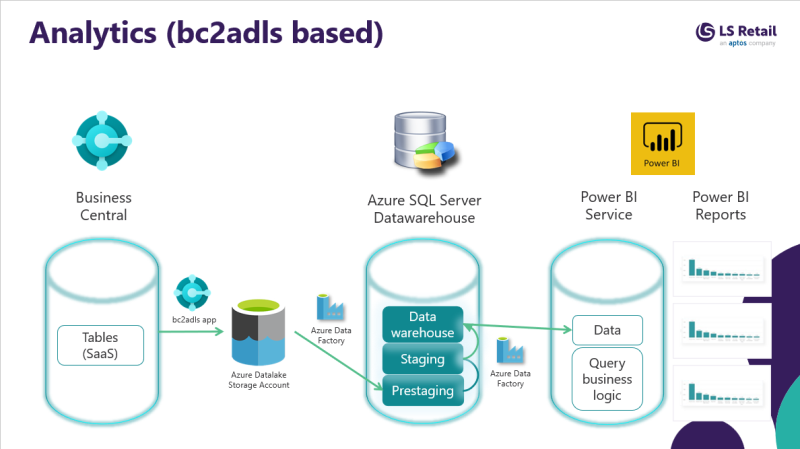
Business Central - LS Central
Your data starts in your LS Central SaaS database. The bc2adls app exports it to an Azure storage account.
From there, Azure Data Factory (ADF) pipelines read the data and load it into the data warehouse.
Azure SQL Server - Data warehouse
The data warehouse stores your data in dimension and fact tables, organized in a star schema, in the Analytics SQL database.
Power BI service - Data model and reports
The Power BI templates you get with Analytics include the data models and reports.
Setup and onboarding
Follow the onboarding process to set up Analytics with bc2adls. The older options are described there too, under Legacy architecture.
Recommended knowledge:
While not mandatory, a basic understanding of
SQL,
Power BI, and
Microsoft Azure helps you get the most value from Analytics. You can build these skills using
Microsoft Learn:
-
SQL (Transact‑SQL querying): https://learn.microsoft.com/en-us/training/paths/get-started-querying-with-transact-sql/
-
Power BI: https://learn.microsoft.com/en-us/training/powerplatform/power-bi
-
Azure data and integration (pipelines, triggers, data movement): https://learn.microsoft.com/en-us/azure/data-factory/
Legacy architecture
Note: This method of using Analytics is not in active development from version 2026-3. It continues to be supported for existing customers, but new customers should use bc2adls.
The legacy architecture (also called "classic") gets data from:
-
LS Central on-premises, or
-
Pre-staging tables populated via Data Director and replication
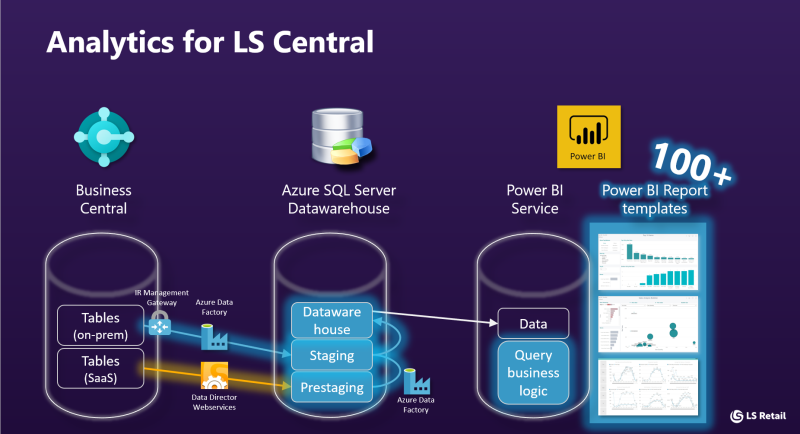
Business Central - LS Central
The source is your LS Central BackOffice database, located in Azure, on a virtual machine, or on an on-premises server.
For an on-premises database, an Integration runtime management gateway must be set up on a machine that is always running.
For LS Central SaaS, an extra step is needed to load the data into Analytics. Azure Data Factory v.2 contains the pipelines that collect the data and load it into the data warehouse.
Azure SQL Server - Data warehouse
The data warehouse dimension and fact tables, in a star schema, are stored in the Analytics SQL database.
Power BI service - Data model and reports
The Power BI templates you get with Analytics include the data models and reports.