The MY ClearTax e-Invoicing integration adds an E-Invoice FastTab to the standard LSC Transaction Card and a Staging Status column to the LSC Transaction Register list. These additions allow back-office staff to check the e-Invoice status of any transaction without leaving the standard transaction views.
E-Invoice FastTab on the Transaction Card
The E-Invoice FastTab appears after the General FastTab on the Transaction Card. All fields in this group are read-only (FlowFields that look up values from the Trans. Header Staging table).
To open a Transaction Card:
- Click the
 icon, enter Transaction Register, and select the relevant link.
 - Select a transaction and choose Open or press Enter to open the Transaction Card.
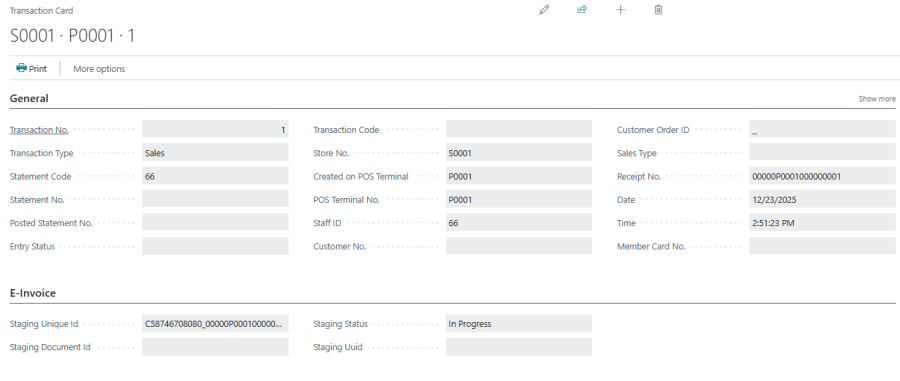
E-Invoice FastTab field reference
| Field | Description |
|---|---|
| Staging Unique Id | The internal document reference generated by LS Central and submitted to ClearTax as the e-Invoice identifier. Derived from the company TIN, receipt number, document type, and transaction date. Populated when a staging entry exists for this transaction. |
| Staging Document Id | The document identifier returned by ClearTax after a successful generate or upload operation. Populated after ClearTax acknowledges the e-Invoice. |
| Staging Status | The current submission status: Pending, In Progress, Valid, or Error. See Scheduler Job for a description of each value. |
| Staging Uuid | The UUID assigned by the IRBM to the validated e-Invoice. This is the official IRBM acknowledgment reference number. Populated only when the status is Valid. |
Actions on the Transaction Card
The integration adds two actions to the E-Invoice group in the action bar of the Transaction Card.
| Action | Description |
|---|---|
| Send Upload | Manually triggers an upload submission to ClearTax for this transaction. Use this to immediately resubmit a transaction that is in Error status or has not yet been processed by the scheduler. The action validates the transaction before submitting. |
| Send Generate | Manually triggers a generate (pre-validation) call to ClearTax for this transaction. This action is disabled and hidden by default. It is provided for workflows that require a separate generate step before upload. Contact your implementation partner before using this action. |
Staging Status column on the Transaction Register
The integration also adds a Staging Status column to the LSC Transaction Register list page. This column shows the current e-Invoice submission status directly in the transaction list, so back-office users can quickly identify transactions that are in Error status or still Pending without opening each card individually.

See also