In this article
Default bill number series source
The GST Setup page contains LS Central-specific fields that control how GST bill numbers are generated and how the system selects the number series source. To open the page:
- Click the
 icon, enter GST Setup, and select the relevant link.
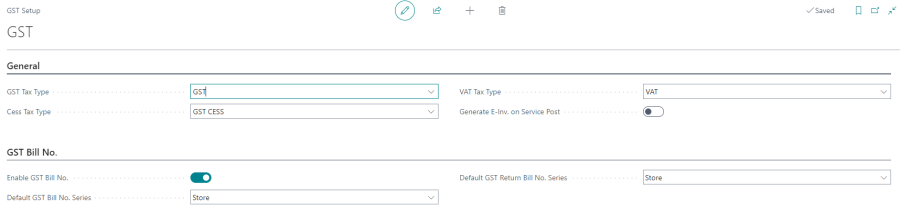
Enable GST Bill Number
The Enable GST Bill No. field is the master switch for GST bill number generation. When this toggle is enabled, the system automatically generates a GST Bill No. when a POS sale transaction is finalized.
- If disabled, no GST bill number is generated and the GST Bill No. field on the POS transaction remains blank.
- If enabled, the system assigns a number from the configured bill number series at the point of sale finalization.
Default bill number series source
When GST bill number generation is enabled, the Default GST Bill No. Series field determines where the number series is sourced from:
| Option | Description |
|---|---|
| POS Terminal (default) | The bill number series is taken from the GST Bill No. Series field on the POS Terminal Card. Use this option when each terminal must maintain an independent bill number sequence. |
| Store | The bill number series is taken from the GST Bill No. Series field on the Store Card. Use this option when all terminals in a store must share a single bill number sequence. |
The Default GST Return Bill No. Series field works the same way for return bill numbers.
For more information about configuring the series on each terminal, see POS Terminal GST Bill Number Series. For store-level series, see Store GST Bill Number Series.
VAT tax type code
The VAT Tax Type field specifies the Tax Type code that the system uses when the applicable tax type is VAT rather than GST. This value is used in jurisdictions or item configurations where VAT applies instead of GST.