In this article
Set up Job Queue DSFinV-K CPC Update
The integration of Fiskaly DSFinV-K with LS Central enables retailers in Germany to comply with legal requirements for secure transaction recording and fiscal reporting. LS Central connects to Fiskaly to manage cash registers, generate daily sales summaries (Cash Point Closings), and export DSFinV-K-compliant reports for audit and compliance purposes.
For cash register configuration, see Cash Registers.
Cash Point Closings
After posting POS transactions, a Cash Point Closing record is generated. You can view these records using either of the following methods:
- In the Posted Statement page, choose Navigate, then select Cash Point Closings.
- In the Fiskaly Setup page, click the Cash Point Closings action.
Note: Even if the State appears as Pending, the record may already be processed on the Fiskaly server. You must schedule a job queue to retrieve the latest status.
Use the Refresh action to update the record's state. For a full reference of Cash Point Closing fields, states, and actions, see Cash Point Closings.

Set up Job Queue DSFinV-K CPC Update
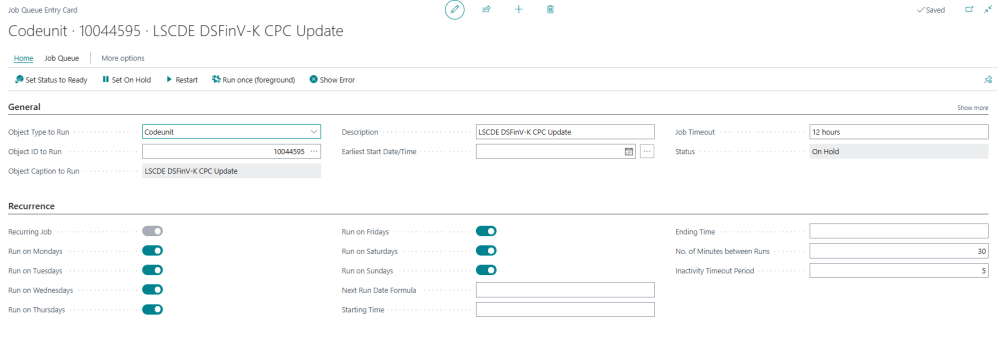
A job queue is required to submit and synchronize the status of Cash Point Closings with the Fiskaly server.
To configure the job queue:
- Click the
 icon, enter Job Queue Entries and select the relevant link.
 - In the Job Queue Entries page, select New.
- In the General FastTab:
- Set Object Type to Run to Codeunit.
- Set Object ID to 10044595 (LSCDE DSFinV-K CPC Update).
-
In the Recurrence FastTab:
- Select the Recurring Job toggle switch to make the job run periodically.
- Specify the days of the week the job should run.
- Optionally, define a time of day for execution and the number of minutes between runs.
Export DSFinV-K Report
When a Cash Point Closing has a State of COMPLETED, you can export the DSFinV-K report from the Fiskaly Dashboard.

See also