In Saas, POS terminals can be deployed to run either online or offline. This page covers the supported architectures for LS Central in Saas and the recommended replication methods to achieve each one.
In this article
Online POS - Distributed companies
Online POS - Distributed environments
Offline POS – Send Transaction using Web Replication
Offline POS – Send Transaction using Storage Queue
Online POS
Click image to expand and collapse

Running the POS online in SaaS is the recommended approach for LS Central in SaaS. POS terminals connect online to a single company in Business Central. For setup considerations and further details on this architecture, refer to the Online POS Model in the LS Central Implementation Guide.
Other components are integrated as follows:
AppShell for LS Central is recommended to use, to run the POS.
Use the Update Service to setup Hardware Station and Appshell for LS Central. Application updates are delivered through the Update Service and that makes it easier to keep these components up-to-date and in sync with the updates in SaaS.
Note: The Update Service is hosted by the customer in Azure (recommended). See the Update Service documentation for setup and configuration guidance.
Mobile Inventory & eCommerce connect directly to Head Office in SaaS.
- For instructions on connecting a mobile device to Head Office in SaaS, refer to the How to: Connect to SaaS from the Mobile Device documentation.
- For instructions on direct connection between Magento and LS Central please refer to LS Central - Magento - Standalone.
ScanPayGo operates via the Commerce Service.
- Full details can be found in the ScanPayGo for LS Central documentation.
Online POS - Distributed companies
Click image to expand and collapse
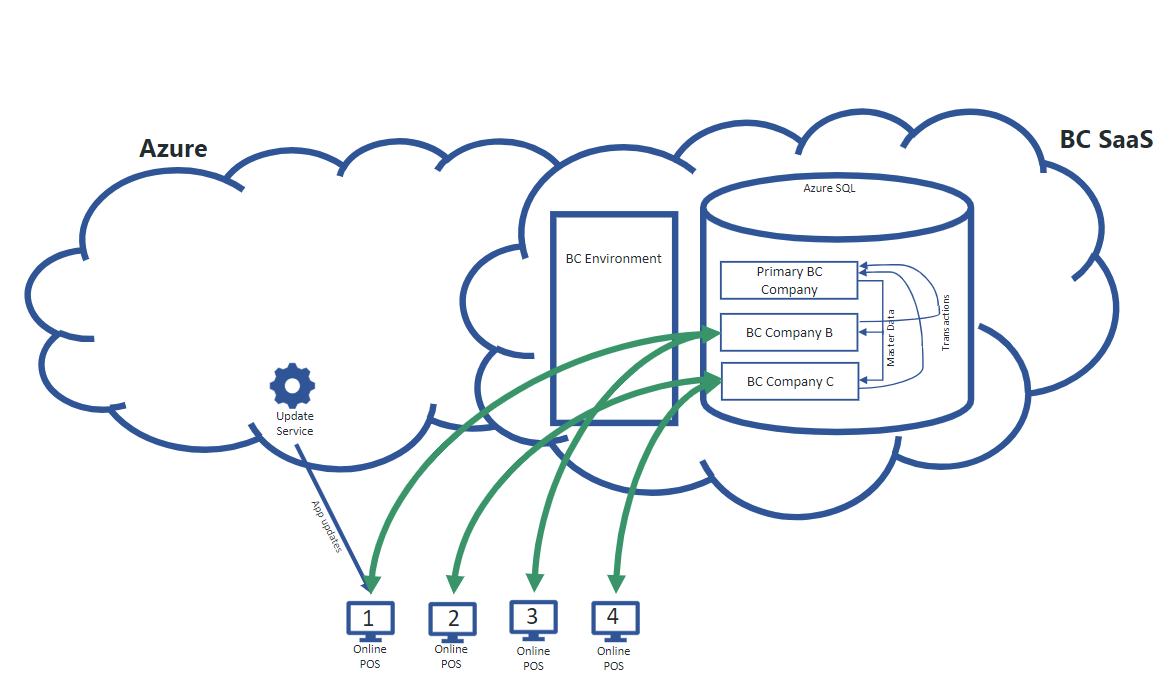
In the Online POS architecture, you have the option of a distributed companies setup. This is suited to customers who want to spread the load across POS terminals to avoid table locking in the main company. Another scenario where this architecture may be required is a franchise model, where the franchisor operates within one company while each franchisee runs in its own separate company.
The architecture
POS terminals run online in SaaS, connecting to multiple companies within Business Central.
- To distribute master data from the main company to the sub-companies without relying on web services, Web Replication with Company-to-Company is used.
- The main company has an overview of the replication process from start to finish.
- This approach helps optimise the use of the customer's SaaS resources, as Microsoft imposes operational limits on Business Central web service calls — capped at 6,000 requests within a 5-minute sliding window.
Other components are integrated as follows:
AppShell for LS Central is recommended to run the POS.
- Use the Update Service to setup Hardware Station and Appshell for LS Central.
- Application updates are delivered through the Update Service and that makes it easier to keep these components up-to-date and in sync with the updates in SaaS.
- The Update Service is hosted by the customer in Azure (recommended). See the Update Service documentation for setup and configuration guidance.
Mobile Inventory & eCommerce connect directly to Head Office in SaaS.
- For instructions on connecting a mobile device to Head Office in SaaS, refer to the How to: Connect to SaaS from the Mobile Device documentation.
- For instructions on direct connection between Magento and LS Central please refer to LS Central - Magento - Standalone.
ScanPayGo operates via the Commerce Service.
- Full details can be found in the ScanPayGo for LS Central documentation.
Online POS - Distributed environments
Click image to expand and collapse
With Online POS, you have the option of running POS in a separate environment to address performance limitations in a single environment.
Another common reason for this architecture is when a customer requires multiple localizations.
In this setup, POS terminals run online in SaaS, connecting to multiple environments within the Business Central tenant.
- The item master is replicated from the Head Office environment to the individual environments using Web Replication (point-to-point).
- Web Replication is initiated at the source environment, transferring data directly to the destination and automatically updating the target tables.
- The source environment provides a complete overview of the entire replication process from start to finish.
Other components are integrated as follows:
AppShell for LS Central is recommended to run the POS.
- Use the Update Service to setup Hardware Station and Appshell for LS Central.
- Application updates are delivered through the Update Service and that makes it easier to keep these components up-to-date and in sync with the updates in SaaS.
- The Update Service is hosted by the customer in Azure (recommended). See the Update Service documentation for setup and configuration guidance.
Mobile Inventory & eCommerce connect directly to Head Office in SaaS.
- For instructions on connecting a mobile device to Head Office in SaaS, refer to the How to: Connect to SaaS from the Mobile Device documentation.
- For instructions on direct connection between Magento and LS Central please refer to LS Central - Magento - Standalone.
ScanPayGo operates via the Commerce Service.
- Full details can be found in the ScanPayGo for LS Central documentation.
Offline POS – Send Transaction using Web Replication

For customers with poor network connectivity in stores, there is an option to run some or all POS terminals in offline mode.
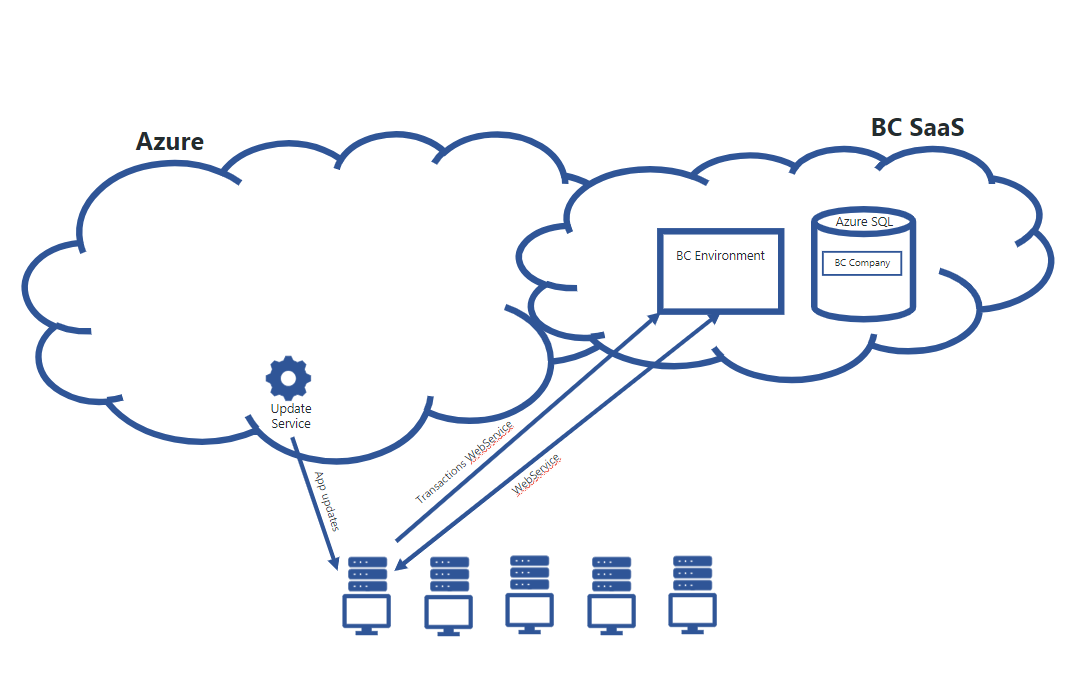
When running offline POS, the recommended approach is to use Web Replication to send transactions to Head Office in SaaS. Customer validations, inventory checks, and similar operations are handled through POS web requests.
Master and setup data is replicated from Head Office in SaaS to the POS terminals using Web Replication with Azure Storage.
- The Scheduler runs in SaaS and pushes updates to the offline POS terminals via Azure Storage.
- The POS then contacts Head Office for updates and pulls the data from Azure Storage, which is inserted into the local POS database.
- Head Office is subsequently updated with the replication status.
Installation:
While not strictly required, it is recommended to use the Update Service for installing offline POS terminals. To simplify setup and ongoing maintenance, LS Retail provides an Offline POS project for the Update Service (Login requred) that automates the creation of the offline POS environment.
Further details on implementation steps can be found here.
Other components are integrated as follows:
Mobile Inventory & eCommerce connect directly to Head Office in SaaS.
- For instructions on connecting a mobile device to Head Office in SaaS, refer to the How to: Connect to SaaS from the Mobile Device documentation.
- For instructions on direct connection between Magento and LS Central please refer to LS Central - Magento - Standalone.
ScanPayGo operates via the Commerce Service.
- Full details can be found in the ScanPayGo for LS Central documentation.
Offline POS – Send Transaction using Storage Queue

For customers with high transaction volumes, or those needing to reduce incoming web service load on the Head Office environment due to Microsoft's operational limits for BC in SaaS, the recommended approach is to use the Storage Queue to Send Transactions.
With this method, transactions are written to storage and queued for asynchronous processing by Head Office. This approach offers several advantages over direct web service calls:
- Head Office controls the speed of data import
- Does not count against Microsoft's web service operational limits
- Decouples POS transaction sending from direct Head Office connectivity, improving reliability
- Eliminates table lock risks in Head Office
- Reduces overall web service load on the SaaS environment
Note: This method is particularly suited for customers with a high number of POS terminals or high transaction volumes.
Customer validations, inventory checks, and similar operations are still handled in real time through POS web requests.
Master and setup data is replicated from Head Office in SaaS to the POS terminals using Web Replication with Azure Storage.
- The Scheduler runs in SaaS and pushes updates to the offline POS terminals via Azure Storage.
- The POS then contacts Head Office for updates and pulls the data from Azure Storage, which is inserted into the local POS database.
- Head Office is subsequently updated with the replication status.
Installation:
While not strictly required, it is recommended to use the Update Service for installing offline POS terminals. To simplify setup and ongoing maintenance, LS Retail provides an Offline POS project for the Update Service (Login requred) that automates the creation of the offline POS environment.
Further details on implementation steps can be found here.
Other components are integrated as follows:
Mobile Inventory & eCommerce connect directly to Head Office in SaaS.
- For instructions on connecting a mobile device to Head Office in SaaS, refer to the How to: Connect to SaaS from the Mobile Device documentation.
- For instructions on direct connection between Magento and LS Central please refer to LS Central - Magento - Standalone.
ScanPayGo operates via the Commerce Service.
- Full details can be found in the ScanPayGo for LS Central documentation.