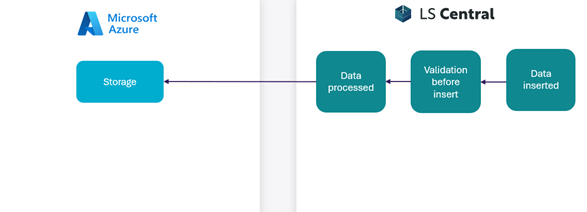
On the image below is the suggested Master data flow from ERP.
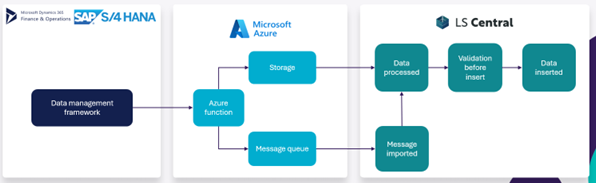
The aim is to use a data management framework in the external ERP system to handle which data should flow from external ERP into LS Central. In cooperation with LS Central the flexibility allows the user to use their existing APIs to write the data into the Azure storage and skip the Azure function.
In the diagram below, the reverse order is shown, or when the sales data is sent from LS Central into the receiving ERP system.
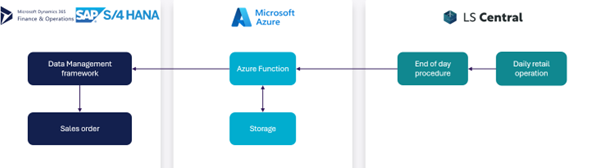
- The data is sent over to Azure functions once the end of day is triggered in LS Central.
- Sales data flows from LS Central and into Azure function where data is converted and packaged in a package for the receiving ERP.
- The Azure function sends the data over to the receiving system, which creates the sales data in the receiving system.
- Finally, the Export functionality, aims at sending data from LS Central and into an azure storage container. This can be a useful feature if you have a third-party application that requires some specific data field names. This can be achieved by using data mapping.