In this article
LS Central Connect Configuration
In CentralConnect AL app there are the following components.
CentralConnect Data Mapping
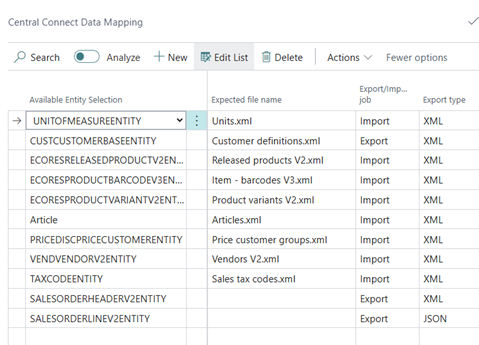
| Field Name | Description |
|---|---|
| Available Entity Selection | Name of the external entity coming from external HO system. |
| Expected file name | What is the name of the file, looking for in Azure storage |
| Export/Import job | Is it a import/export job? |
| Export type | Enum select available export types. Only for Export now. |
Data mapping lines
Setting up the data mapping is a simple process, where the XML schema importer can be utilized and set up to which table and field ID it belongs to.
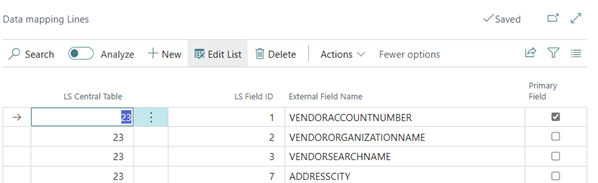
| Field Name | Description |
|---|---|
| LS Central Table | Table ID that is being mapped with. |
| LS Field ID | Field ID for the Table being mapped. |
| External field name | The external field is referring to the XML attribute. |
| Primary field | Indicates if this is a Primary field or not. |
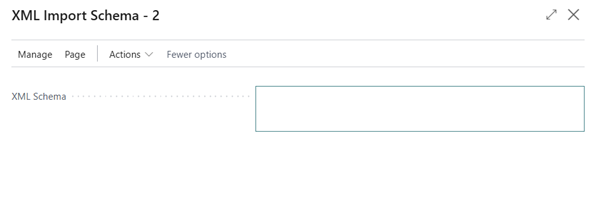
It is possible to use the XML import schema to save time with the data mapping.
- Add the XML schema, the user can import that and the functionality adds the External field names into the data mapping lines.
- Fill in Table and Field ID.
CentralConnect Import List
- Complete the data mapping.
- The data importing can start.
- When the new data package is inserted it can be processed and sent to staging for further validation before inserting.
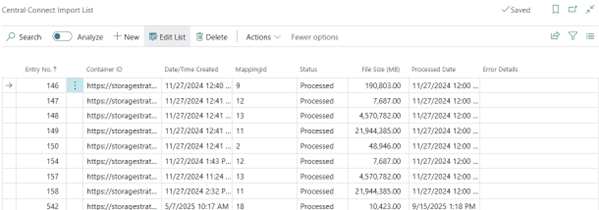
| Field Name | Description |
|---|---|
| Entry No. | Identification field. |
| LS Field ID | Container ID unique identifier for the Azure container file |
| Date/time created | Date/time imported. |
| MappingID | Which mapping it belongs to. |
|
Status |
Enum: Not Started; Processed; Cancelled;Error. |
|
File Size |
File size of the package. |
|
Processed Date displays here |
Date when processed. |
| Error Details | If error occurs error. |
CentralConnect Logging
You log into steps that are taken in the CentralConnect functionality; the level of logging is controlled by our CentralConnect Configuration page.
The levels are None, Info; Warning and Error; Only Error; All
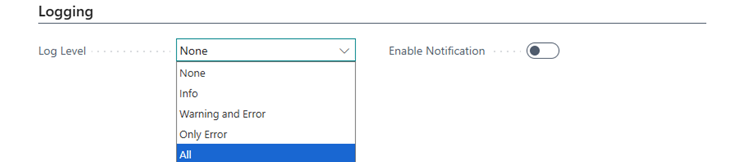
Selecting All log level in the configuration page, is only recommended in case of implementation. The recommended level is warning and error, in case of error you have the option of retrying the step that failed.
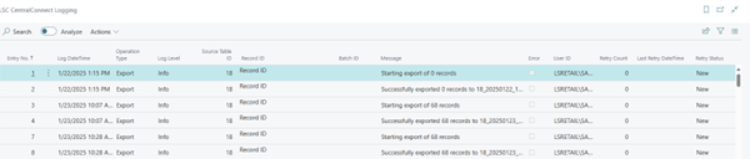
| Field Name | Description |
|---|---|
| Entry No. | Identification field. |
| Log Date/time | Date / Time of log. |
| Operation Type | What type is Export or import. |
| Log level | Severity of the error. |
| Message |
Details about the step that was taken. |
| Error |
Boolean yes/no. |
| User ID | User ID of user registered for the action. |
| Retry count | How many times has it been retried. |
LS Central Connect Configuration
The configuration page controls, which apps, and which functions it calls during the connectivity to the Azure environment.
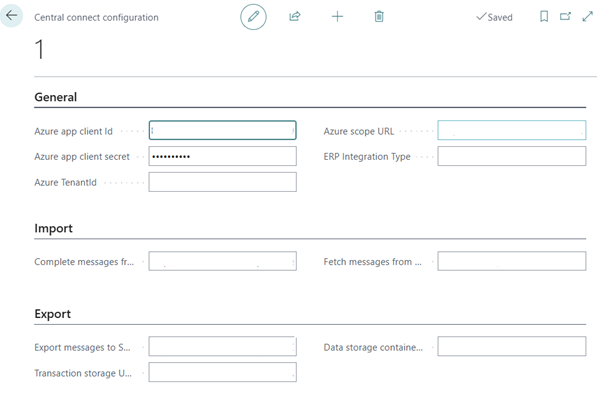
| Field Name | Description |
|---|---|
| Azure app client Id | Azure application ID, needs an azure application that distributes the privileges for the different azure components and is usually used to authenticate with external HO systems. |
| Azure Scope URL | https://{Resource}.azure.net/.default. |
| Azure app client secret | Client secret ID got from portal.azure.com once the app is created. See Azure Components for application creation. |
| Azure TenantId | The ID of the azure tenant for the application. |
| ERP Integration Type |
Not implemented, meant for Different HO systems. |
| Complete messages from |
URL to the Azure function that handles messages. |
| Fetch messages from | URL to the service bus message queue. |
| Export message to | Azure function that handles sales transfer. |
| Data storage container | URL to the azure storage keeping the data packages. |
| Transaction storage URL | URL to the Azure storage keeping the transactions. |
Central Connect staging table
The staging process handles the base validation for packages that have been imported into LS Central and are waiting for insertion. The data is ready for import, when it has been validated.
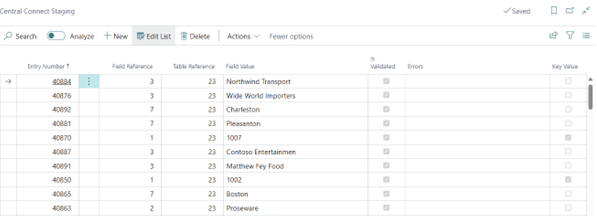
| Field Name | Description |
|---|---|
| Entry Number | Identification for the record. |
| Field reference | Field Id being imported into. |
| Table reference | Table Id being imported into. |
| Field Value | Field value gotten from the XML from HO system. |
| Is Validated | Boolean: Yes/No. |
| Error | If error occurs, then displayed here. |
| Key Value | Whether the field is key value or not, fetched from the data mapping. |