In this article
Actions on the Fiscal Setup Page
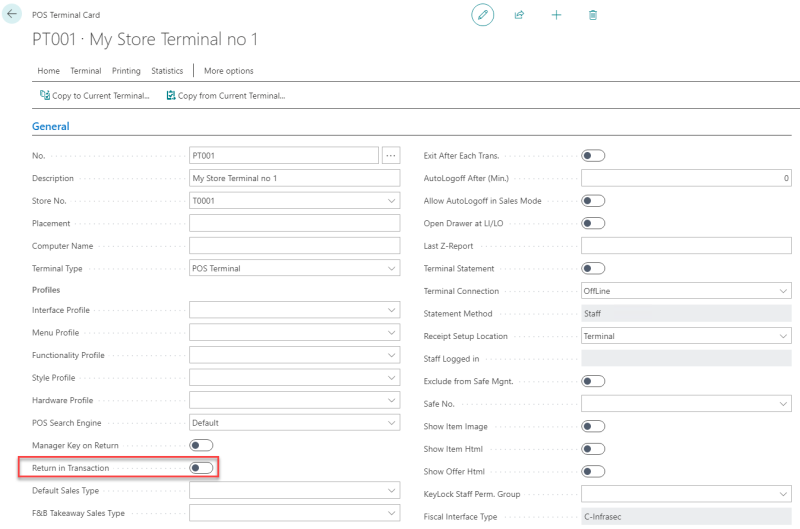
Terminal Setting for Return in Transaction
InLS Central BackOffice, the fiscal setup for each POS terminal in the store provides actions that you can use to test the fiscal connection, view the fiscal entries registered for the terminal, and clear the imported certificate. The POS Terminal Card also has a setting that you must turn off for the Swedish fiscal requirements.
Actions on the Fiscal Setup Page
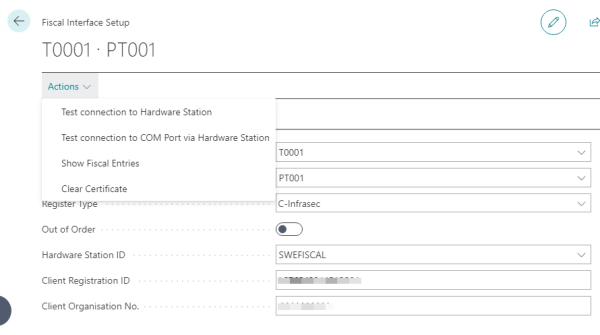
Test connection to Hardware Station:
- Returns Test OK when successful.
Test connection to COM port via Hardware Station:
- For the Type A options, it returns a string with information, if successful.
Show Fiscal Entries:
- Shows all POS Fiscal Entries for the terminal, including information about the transaction. For more information, see Fiscal Entries.
Clear Certificate:
- For the Type C option, clears the imported certificate for the terminal.
Terminal Setting for Return in Transaction
-
Set up the terminals so they cannot sell and return in the same transaction. The Return in Transaction toggle on the POS Terminal Card must be turned off.