In this article
To set up a scale item for two-decimal quantity precision
How scale item quantity precision works in POS
Set up NTEP certification for scales
The North America (NA) localization for LS Central displays the Quantity of a scale item, sold in a weight-based unit of measure, with two decimal places on the POS (for example, 2.00kg) when NTEP Certification is turned on in the POS functionality profile, to match local weight and measurement conventions. This is different from other LS Central localizations, where weight-based quantities can show up to three decimal places, and where the extra precision is not limited to items that are specifically flagged as scale items.
To set up a scale item for two-decimal quantity precision
-
Click the
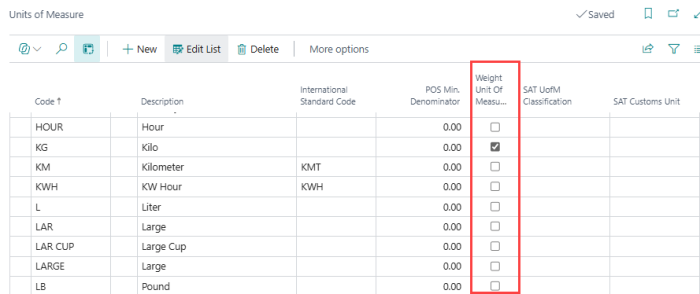
 icon, enter Units of Measure, and select the relevant link. On the unit of measure that represents the weight your scale reports in, such as LB or KG, select the Weight Unit of Measure check box.
-
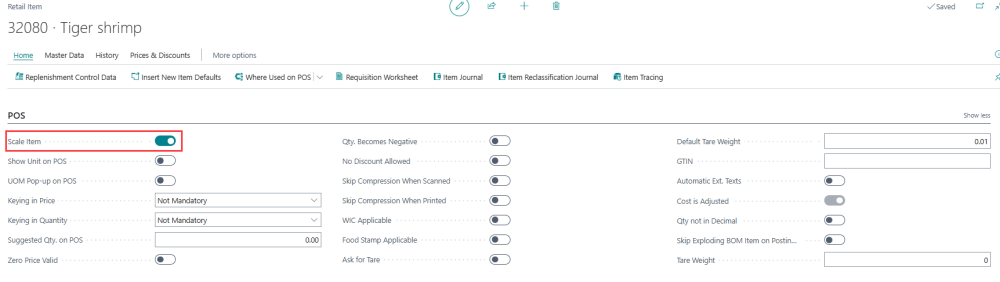
Open the Retail Item Card for the item, and go to the POS FastTab.
-
Select the Scale Item check box.
- If the Sales Unit of Measure field is blank, the system automatically fills it in with the weight unit of measure you flagged in step 1.
- If the Sales Unit of Measure field already contains a different unit of measure, the system shows an error. The Sales Unit of Measure for a scale item must be the weight unit of measure.
-
Optional: To subtract the weight of the container (such as a tray or bag) from the weight the scale reads, click Show more on the POS FastTab, and set the Default Tare Weight field. Enter the tare weight in kilograms or pounds, depending on the unit of measure you use. The field accepts a maximum of two decimal places — for example, enter 0.01 to represent 0.01 kg (10 grams). A value with more decimal places, such as 0.005, is rejected with an error.
-
Add and configure the Scale device for the physical scale that is connected to the POS through OPOS on the POS terminal's Hardware Profile. For NTEP-compliant operation, connect a physical scale that reports the live weight. If no Scale device is active on the hardware profile, the scale validations do not run. See Scale for details.
Note: The Sales Unit of Measure validation described in step 3 only runs when the Scale Item check box is selected. Set up the weight unit of measure (step 1) before marking the item as a scale item.
How scale item quantity precision works in POS
When NTEP Certification is turned on in the POS functionality profile, the NA localization overrides the standard POS quantity format so that any quantity in a unit of measure that is flagged as a Weight Unit of Measure is shown with exactly two decimal places, for example 2.00kg. This applies regardless of which transaction line is selected, and regardless of any other quantity rounding or precision setup on the item or unit of measure. Quantities in units of measure that are not flagged as a Weight Unit of Measure are displayed using the standard format, for example as a whole number for items sold by piece. When NTEP Certification is turned off, the quantity format is not changed. See Set up NTEP certification for scales.
The net and tare weights on receipts also use two decimal places, including when a receipt is reprinted and when it is printed after payment.
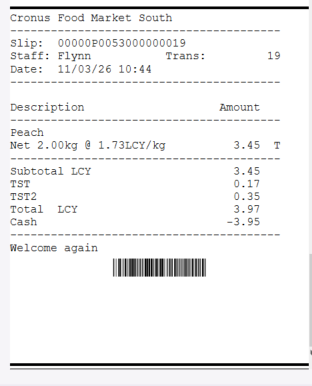
A receipt for a scale item, showing the net weight with two decimal places.
The Live and Max weight values on the POS screen follow the two-decimal format only where the POS client uses the quantity formatting.
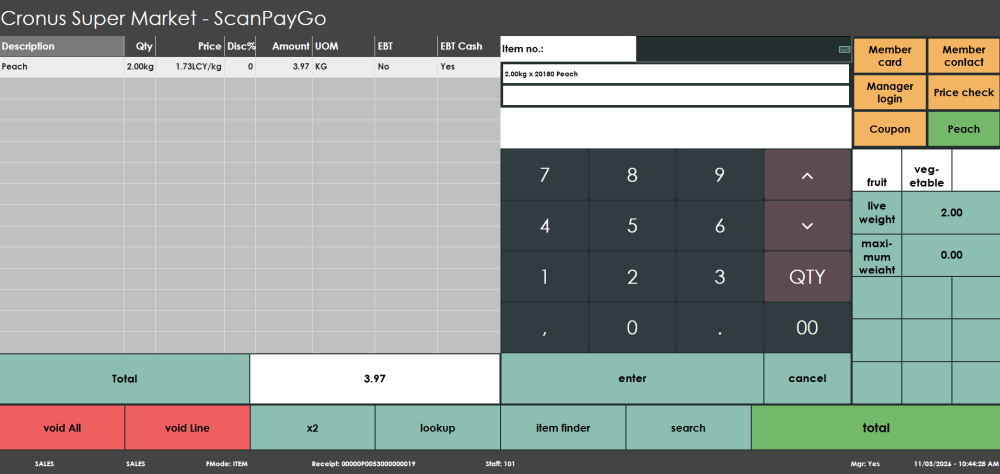
A scale item line on the POS journal, showing the quantity with two decimal places, and the live and maximum weight values.
The POS reads the weight from the Scale device on the Hardware Profile automatically when the item is added to the transaction. When Live Weight and Scale Validation is turned on, the POS checks the state of the scale before the item can proceed. If a check fails, the POS beeps and shows an error message, for example if the scale is not ready, the weight is unstable, the scale shows a weight under zero, the item is overweight for the scale, or a previous item was not removed from the scale before another item was added. The POS also blocks the transaction from moving to payment while there is weight on the scale.
On a refund, the scale must be in a clear, ready state before the return line for a scale item can proceed.
If a Default Tare Weight is set up for the item, the POS subtracts it from the weight before calculating the quantity. When NTEP Certification is turned on, the tare weight is also printed as a separate Tare line on the receipt.
Set up NTEP certification for scales
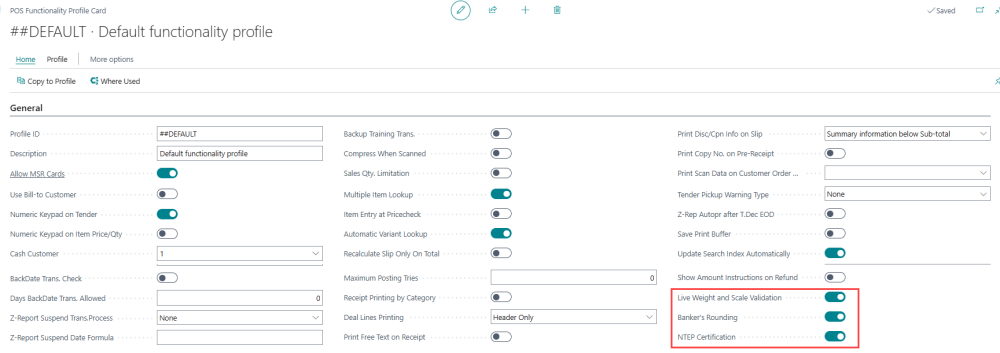
Three check boxes on the General FastTab of the POS Functionality Profile Card control the NTEP behavior for scales.
| Field | Description |
|---|---|
| Live Weight and Scale Validation | Specifies whether the POS runs scale validations. When the setting is turned off, the POS does not show weight validation error pop-ups. The validations apply only when a scale device is active in the hardware profile. When they apply, the POS blocks actions while there is weight on the scale, including when non-scale items are scanned. |
| Banker's Rounding | Specifies that amounts of scale items are rounded to the nearest even value instead of using normal rounding. This applies to scale items only. |
| NTEP Certification | Turns on Live Weight and Scale Validation and Banker's Rounding, and makes unit of measure formatting follow the NTEP standard of two decimal places, on the POS and on receipts. While NTEP Certification is turned on, you cannot turn off the other two settings. If you try, the system shows an error such as Live Weight and Scale Validation cannot be turned off while NTEP Certification is enabled. or Banker's Rounding cannot be turned off while NTEP Certification is enabled. |
To turn on NTEP certification:
- Click the icon, enter POS Functionality Profile, and select the relevant link.
- Open the profile card for the POS functionality profile that your POS terminals use.
- On the General FastTab, select the NTEP Certification check box.
See also
- Units of Measure
- How to: Configure Price and Quantity for Scale Items
- How to: Set Up Tare Handling for Scales
- Scale
- Point of Sale