In this article
Basket Calculation Logic (Magento Integration)
Overview
This document outlines the difference in sales tax calculation methods between North America (NA) and other regions, and how LS Central tax area configurations are leveraged to determine applicable tax rates during basket calculation. It also details the required configuration to calculate tax based on shipping address parameters and store selection for Click and Collect scenarios.
Tax Calculation Models
North America (Destination-Based Model)
In North America, sales tax is typically destination-based, meaning the tax rate is determined by the location where the goods are delivered. This can involve multiple tax jurisdictions (state, county, city, and special districts).
Key Characteristics:
- Tax rates are based on shipping address (postcode, state, and sometimes city/county).
- Different jurisdictions can layer taxes (e.g., state + county + city).
- Tax rules can vary between:
- Origin-based states (less common): tax based on seller’s location.
- Destination-based states (most common): tax based on buyer’s shipping location.
- Tax calculation often uses postcode and state as the primary identifiers.
Example:
A product shipped from California to Kansas will have Kansas sales tax applied, based on the specific delivery address.
Other Regions
In North America, sales tax is typically destination-based, meaning the tax rate is determined by the location where the goods are delivered. This can involve multiple tax jurisdictions (state, county, city, and special districts).
In many regions outside North America (such as, EU), tax is commonly VAT-based:
- The tax rate is determined by the single national VAT rate.
- Typically, uniform tax rates across the entire country or region.
- Less reliance on postcode/state level configuration.
Example:
A product shipped within Germany typically applies the same VAT rate regardless of the destination address.
LS Central Tax Structure
LS Central uses a Tax Area Code and Tax Jurisdiction Code structure to manage tax rates.
Tax Area Code
- Represents a geographical tax area.
- Each Tax Area Code can have multiple Tax Jurisdiction Codes (such as, state, county, city).
- Each jurisdiction defines its own percentage rate.


Postcode Mapping
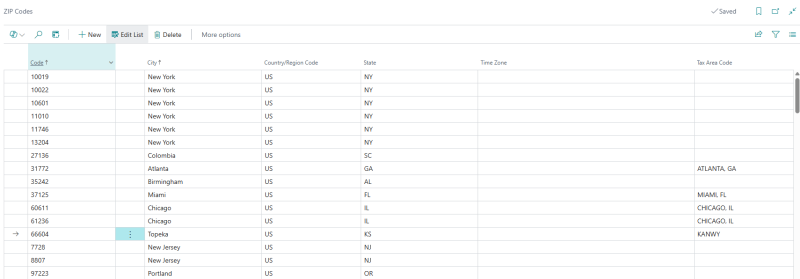
- Under Zip Codes, LS Central maps following to a Tax Area Code:
- Postcode
- County
- Country Code
- When a shipping address is provided, LS Central determines which Tax Area Code applies based on the postcode and county.
Basket Calculation Logic (Magento Integration)
In Magento, basket calculation occurs whenever an item is added to the cart. During this step:
- If the shipping method is Flat Rate:
- Postcode, state, and country from the selected shipping address are passed in the basket calculation request.
- LS Central:
- Looks up the postcode and maps it to the correct Tax Area Code.
- Applies the defined jurisdiction tax rates.
- Magento:
- Receives the calculated sales tax amount and applies it to the basket.
Magento Configuration
To align with NA tax calculation logic, a new configuration needs to be enabled, in magento admin under Basket Calculation called Calculate Tax Based on Shipping Address.

When enabled, the basket calculation request includes shipping address parameters:
- Postcode
- State
- Country
This allows LS Central to:
- Determine the correct Tax Area Code.
- Return accurate tax amounts for the customer’s delivery location.
Delivery Order Flow
In case of delivery orders, the tax area code defined for the corresponding webstore is used by default when no shipTo parameter is provided.
However, if shipTo parameters such as ShipToCountryRegionCode, ShipToPostCode, or ShipToCounty are provided in the basket request, the tax area code is inferred based on the provided shipping information and applied accordingly.

Example
- Customer adds item to cart.
- Shipping method = Flat Rate.
- Basket Calculation sends:
- Postcode: 66604
- County: KS
- Country: US
- LS Central finds Tax Area Code KANWY.
- Returns sales tax = 6%.
<?xml version="1.0" encoding="utf-8"?>
<soap:Envelope xmlns:xsi="http://www.w3.org/2001/XMLSchema-instance" xmlns:xsd="http://www.w3.org/2001/XMLSchema" xmlns:soap="http://schemas.xmlsoap.org/soap/envelope/">
    <soap:Body>
        <EcomCalculateBasket xmlns="urn:microsoft-dynamics-schemas/codeunit/OmniWrapper">
            <responseCode>0</responseCode>
            <errorText> </errorText>
            <mobileTransactionXML>
                <MobileTransaction xmlns="urn:microsoft-dynamics-nav/xmlports/x99009610">
                    <Id>A91B80C5-142B-4BC2-9F92-AB211C3D4554</Id>
                    <StoreId>S0013</StoreId>
                    <TransactionType>2</TransactionType>
                    <TransDate>2026-09-29T13:54:42.6811466+00:00</TransDate>
                    <CurrencyCode>USD</CurrencyCode>
                    <CurrencyFactor>1</CurrencyFactor>
                    <PriceGroupCode />
                    <CustomerId />
                    <MemberCardNo>10001</MemberCardNo>
                    <MemberPriceGroupCode />
                    <SourceType>1</SourceType>
                    <SalesType />
                    <ShipToCountryRegionCode>US</ShipToCountryRegionCode>
                    <ShipToPostCode>66604</ShipToPostCode>
                    <ShipToCounty>KS</ShipToCounty>
                </MobileTransaction>
                <MobileTransactionLine xmlns="urn:microsoft-dynamics-nav/xmlports/x99009610">
                    <Id>A91B80C5-142B-4BC2-9F92-AB211C3D4554</Id>
                    <StoreId>S0013</StoreId>
                    <LineNo>10000</LineNo>
                    <Number>40000</Number>
                    <CurrencyFactor>1</CurrencyFactor>
                    <VariantCode />
                    <UomId />
                    <Quantity>1</Quantity>
                    <TransDate>2026-09-29T13:54:42.6811466+00:00</TransDate>
                </MobileTransactionLine>
            </mobileTransactionXML>
        </EcomCalculateBasket>
    </soap:Body>
</soap:Envelope><Soap:Envelope xmlns:Soap="http://schemas.xmlsoap.org/soap/envelope/">
<Soap:Body>
<EcomCalculateBasket_Result xmlns="urn:microsoft-dynamics-schemas/codeunit/OmniWrapper">
<responseCode>0000</responseCode>
<errorText/>
<mobileTransactionXML>
<MobileTransaction xmlns="urn:microsoft-dynamics-nav/xmlports/x99009610">
<Id>{A91B80C5-142B-4BC2-9F92-AB211C3D4554}</Id>
<StoreId>S0013</StoreId>
<TerminalId>P0040</TerminalId>
<StaffId>1301</StaffId>
<TransactionType>2</TransactionType>
<EntryStatus>0</EntryStatus>
<ReceiptNo/>
<TransactionNo>0</TransactionNo>
<TransDate>2026-10-07T07:31:58.273Z</TransDate>
<CurrencyCode>USD</CurrencyCode>
<CurrencyFactor>1.00</CurrencyFactor>
<GenBusPostingGroup/>
<VATBusPostingGroup/>
<PriceGroupCode/>
<CustomerId>44090</CustomerId>
<CustDiscGroup/>
<MemberCardNo>10001</MemberCardNo>
<MemberPriceGroupCode/>
<ManualTotalDiscPercent>0.00</ManualTotalDiscPercent>
<ManualTotalDiscAmount>0.00</ManualTotalDiscAmount>
<SourceType>1</SourceType>
<NetAmount>72.00</NetAmount>
<GrossAmount>76.32</GrossAmount>
<Payment>0.00</Payment>
<LineDiscount>0.00</LineDiscount>
<TotalDiscount>0.00</TotalDiscount>
<IncomeExpAmount>0.00</IncomeExpAmount>
<Prepayment>0.00</Prepayment>
<SaleIsReturnSale>false</SaleIsReturnSale>
<RefundedReceiptNo/>
<RefundedFromStoreNo/>
<RefundedFromPOSTermNo/>
<RefundedFromTransNo>0</RefundedFromTransNo>
<TableNo>0</TableNo>
<NoofCovers>0</NoofCovers>
<DiningTblDescription/>
<MaxSeatingCapacity>0</MaxSeatingCapacity>
<SalesType/>
<PointBalance>0.00</PointBalance>
<PointsUsedInBasket>0.00</PointsUsedInBasket>
<AmountRemaining>76.32</AmountRemaining>
<BasketInPoints>763.20</BasketInPoints>
<IssuedPoints>76.32</IssuedPoints>
<ShipToCountryRegionCode>US</ShipToCountryRegionCode>
<ShipToPostCode>66604</ShipToPostCode>
<ShipToCounty>KS</ShipToCounty>
</MobileTransaction>
<MobileTransactionLine xmlns="urn:microsoft-dynamics-nav/xmlports/x99009610">
<Id>{A91B80C5-142B-4BC2-9F92-AB211C3D4554}</Id>
<StoreId>S0013</StoreId>
<TerminalId>P0040</TerminalId>
<LineNo>10000</LineNo>
<EntryStatus>0</EntryStatus>
<LineType>0</LineType>
<Number>40000</Number>
<Barcode/>
<CurrencyCode>USD</CurrencyCode>
<CurrencyFactor>1.00</CurrencyFactor>
<VariantCode/>
<UomId/>
<CouponFunction>0</CouponFunction>
<ValidInTransaction>0</ValidInTransaction>
<CouponCode/>
<NetPrice>72.00</NetPrice>
<Price>72.00</Price>
<Quantity>1</Quantity>
<DiscountAmount>0.00</DiscountAmount>
<DiscountPercent>0.00</DiscountPercent>
<NetAmount>72.00</NetAmount>
<TAXAmount>4.32</TAXAmount>
<VatBusPostingGroup/>
<VatProdPostingGroup>STANDARD</VatProdPostingGroup>
<GenBusPostingGroup/>
<GenProdPostingGroup>RETAIL</GenProdPostingGroup>
<ManualPrice>0.00</ManualPrice>
<CardOrCustNo/>
<ManualDiscountPercent>0.00</ManualDiscountPercent>
<ManualDiscountAmount>0.00</ManualDiscountAmount>
<DiscInfoLine>0</DiscInfoLine>
<TotalDiscInfoLine>0</TotalDiscInfoLine>
<ItemDescription>Jeans Linda line</ItemDescription>
<VariantDescription/>
<UomDescription/>
<TenderDescription/>
<TransDate/>
<ExternalId>0</ExternalId>
<EFTCardNumber/>
<EFTCardName/>
<EFTAuthCode/>
<EFTMessage/>
<EFTVerificationMethod>0</EFTVerificationMethod>
<EFTTransactionNo/>
<EFTAuthStatus>0</EFTAuthStatus>
<EFTTransType>0</EFTTransType>
<EFTDateTime/>
<ExternalLineNo>0</ExternalLineNo>
<DealItem>0</DealItem>
<StaffId/>
<SalesType/>
<PriceGroupCode/>
<RestMenuType>0</RestMenuType>
<RestMenuTypeCode/>
<GuestSeatNo>0</GuestSeatNo>
<KitchenRouting>0</KitchenRouting>
<LineKitchenStatus>0</LineKitchenStatus>
<LineKitchenStatusCode>NR</LineKitchenStatusCode>
<RecommendedItem>false</RecommendedItem>
<OrigTransStore/>
<OrigTransPos/>
<OrigTransNo>0</OrigTransNo>
<OrigTransLineNo>0</OrigTransLineNo>
<RetailImageID>40000</RetailImageID>
</MobileTransactionLine>
</mobileTransactionXML>
</EcomCalculateBasket_Result>
</Soap:Body>
</Soap:Envelope>Click and Collect Order Flow
In case of Click & Collect orders, a tax area code must be configured for each Click & Collect store.
In the basket request, the selected Click & Collect store must be provided so that the applicable tax area code can be determined from the store and the correct tax can be applied.

Example
- Customer adds item to cart.
- Customer selects Store #S0001.
- Basket Calculation sends:
- Store ID: S0001
- LS Central uses Tax Area Code assigned to Store #S0001.
- Returns sales tax = 6%.
<?xml version="1.0" encoding="utf-8"?>
<soap:Envelope xmlns:xsi="http://www.w3.org/2001/XMLSchema-instance" xmlns:xsd="http://www.w3.org/2001/XMLSchema" xmlns:soap="http://schemas.xmlsoap.org/soap/envelope/">
    <soap:Body>
        <EcomCalculateBasket xmlns="urn:microsoft-dynamics-schemas/codeunit/OmniWrapper">
            <responseCode>0</responseCode>
            <errorText> </errorText>
            <mobileTransactionXML>
                <MobileTransaction xmlns="urn:microsoft-dynamics-nav/xmlports/x99009610">
                    <Id>A91B80C5-142B-4BC2-9F92-AB211C3D4554</Id>
                    <StoreId>S0001</StoreId>
                    <TransactionType>2</TransactionType>
                    <TransDate>2026-09-29T13:54:42.6811466+00:00</TransDate>
                    <CurrencyCode />
                    <CurrencyFactor>1</CurrencyFactor>
                    <PriceGroupCode />
                    <CustomerId />
                    <MemberCardNo>10001</MemberCardNo>
                    <MemberPriceGroupCode />
                    <SourceType>1</SourceType>
                    <SalesType />
                    <ShipToCountryRegionCode />
                    <ShipToPostCode />
                    <ShipToCounty />
                </MobileTransaction>
                <MobileTransactionLine xmlns="urn:microsoft-dynamics-nav/xmlports/x99009610">
                    <Id>A91B80C5-142B-4BC2-9F92-AB211C3D4554</Id>
                    <StoreId>S0001</StoreId>
                    <LineNo>10000</LineNo>
                    <Number>40000</Number>
                    <CurrencyFactor>1</CurrencyFactor>
                    <VariantCode />
                    <UomId />
                    <Quantity>1</Quantity>
                    <TransDate>2026-09-29T13:54:42.6811466+00:00</TransDate>
                </MobileTransactionLine>
            </mobileTransactionXML>
        </EcomCalculateBasket>
    </soap:Body>
</soap:Envelope><Soap:Envelope xmlns:Soap="http://schemas.xmlsoap.org/soap/envelope/">
<Soap:Body>
<EcomCalculateBasket_Result xmlns="urn:microsoft-dynamics-schemas/codeunit/OmniWrapper">
<responseCode>0000</responseCode>
<errorText/>
<mobileTransactionXML>
<MobileTransaction xmlns="urn:microsoft-dynamics-nav/xmlports/x99009610">
<Id>{A91B80C5-142B-4BC2-9F92-AB211C3D4554}</Id>
<StoreId>S0001</StoreId>
<TerminalId>P0072</TerminalId>
<StaffId>110</StaffId>
<TransactionType>2</TransactionType>
<EntryStatus>0</EntryStatus>
<ReceiptNo/>
<TransactionNo>0</TransactionNo>
<TransDate>2026-10-07T07:35:20.717Z</TransDate>
<CurrencyCode>USD</CurrencyCode>
<CurrencyFactor>1.00</CurrencyFactor>
<GenBusPostingGroup/>
<VATBusPostingGroup/>
<PriceGroupCode/>
<CustomerId>44090</CustomerId>
<CustDiscGroup/>
<MemberCardNo>10001</MemberCardNo>
<MemberPriceGroupCode/>
<ManualTotalDiscPercent>0.00</ManualTotalDiscPercent>
<ManualTotalDiscAmount>0.00</ManualTotalDiscAmount>
<SourceType>1</SourceType>
<NetAmount>72.00</NetAmount>
<GrossAmount>76.32</GrossAmount>
<Payment>0.00</Payment>
<LineDiscount>0.00</LineDiscount>
<TotalDiscount>0.00</TotalDiscount>
<IncomeExpAmount>0.00</IncomeExpAmount>
<Prepayment>0.00</Prepayment>
<SaleIsReturnSale>false</SaleIsReturnSale>
<RefundedReceiptNo/>
<RefundedFromStoreNo/>
<RefundedFromPOSTermNo/>
<RefundedFromTransNo>0</RefundedFromTransNo>
<TableNo>0</TableNo>
<NoofCovers>0</NoofCovers>
<DiningTblDescription/>
<MaxSeatingCapacity>0</MaxSeatingCapacity>
<SalesType/>
<PointBalance>0.00</PointBalance>
<PointsUsedInBasket>0.00</PointsUsedInBasket>
<AmountRemaining>76.32</AmountRemaining>
<BasketInPoints>763.20</BasketInPoints>
<IssuedPoints>76.32</IssuedPoints>
<ShipToCountryRegionCode/>
<ShipToPostCode/>
<ShipToCounty/>
</MobileTransaction>
<MobileTransactionLine xmlns="urn:microsoft-dynamics-nav/xmlports/x99009610">
<Id>{A91B80C5-142B-4BC2-9F92-AB211C3D4554}</Id>
<StoreId>S0001</StoreId>
<TerminalId>P0072</TerminalId>
<LineNo>10000</LineNo>
<EntryStatus>0</EntryStatus>
<LineType>0</LineType>
<Number>40000</Number>
<Barcode/>
<CurrencyCode>USD</CurrencyCode>
<CurrencyFactor>1.00</CurrencyFactor>
<VariantCode/>
<UomId/>
<CouponFunction>0</CouponFunction>
<ValidInTransaction>0</ValidInTransaction>
<CouponCode/>
<NetPrice>72.00</NetPrice>
<Price>72.00</Price>
<Quantity>1</Quantity>
<DiscountAmount>0.00</DiscountAmount>
<DiscountPercent>0.00</DiscountPercent>
<NetAmount>72.00</NetAmount>
<TAXAmount>4.32</TAXAmount>
<VatBusPostingGroup/>
<VatProdPostingGroup>STANDARD</VatProdPostingGroup>
<GenBusPostingGroup/>
<GenProdPostingGroup>RETAIL</GenProdPostingGroup>
<ManualPrice>0.00</ManualPrice>
<CardOrCustNo/>
<ManualDiscountPercent>0.00</ManualDiscountPercent>
<ManualDiscountAmount>0.00</ManualDiscountAmount>
<DiscInfoLine>0</DiscInfoLine>
<TotalDiscInfoLine>0</TotalDiscInfoLine>
<ItemDescription>Jeans Linda line</ItemDescription>
<VariantDescription/>
<UomDescription/>
<TenderDescription/>
<TransDate/>
<ExternalId>0</ExternalId>
<EFTCardNumber/>
<EFTCardName/>
<EFTAuthCode/>
<EFTMessage/>
<EFTVerificationMethod>0</EFTVerificationMethod>
<EFTTransactionNo/>
<EFTAuthStatus>0</EFTAuthStatus>
<EFTTransType>0</EFTTransType>
<EFTDateTime/>
<ExternalLineNo>0</ExternalLineNo>
<DealItem>0</DealItem>
<StaffId/>
<SalesType/>
<PriceGroupCode/>
<RestMenuType>0</RestMenuType>
<RestMenuTypeCode/>
<GuestSeatNo>0</GuestSeatNo>
<KitchenRouting>0</KitchenRouting>
<LineKitchenStatus>0</LineKitchenStatus>
<LineKitchenStatusCode>NR</LineKitchenStatusCode>
<RecommendedItem>false</RecommendedItem>
<OrigTransStore/>
<OrigTransPos/>
<OrigTransNo>0</OrigTransNo>
<OrigTransLineNo>0</OrigTransLineNo>
<RetailImageID>40000</RetailImageID>
</MobileTransactionLine>
</mobileTransactionXML>
</EcomCalculateBasket_Result>
</Soap:Body>
</Soap:Envelope>Tax Area Code Priority
In LS Central, tax is calculated based on a defined priority. Since a tax area code can be configured at different levels, Central determines the applicable tax area code in the following priority order:
- Ship-to Address Tax Area Code
The tax area code is determined based on the shipping address parameters provided in the basket request. This is particularly useful for delivery orders where a shipping address is available.
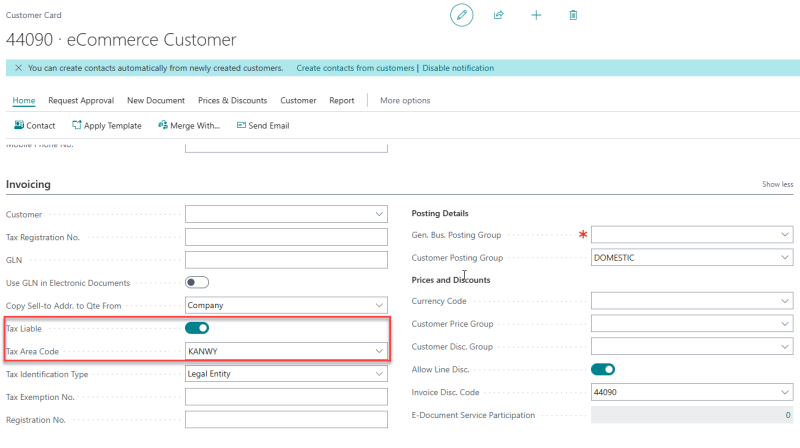
- Customer Tax Area Code
The tax area code configured for the customer on the Customer Card → Invoicing section is used when no applicable ship-to address tax area code is available.
- Store Tax Area Code
The tax area code configured for the selected store is used when no applicable ship-to address or customer tax area code is available. This is particularly useful for Click & Collect orders, where the selected Click & Collect store determines the applicable tax area code.
Troubleshooting
If you are using basket calculation and see taxAmount = 0 in the response, double check all the setup explained in this topic including following two configurations.
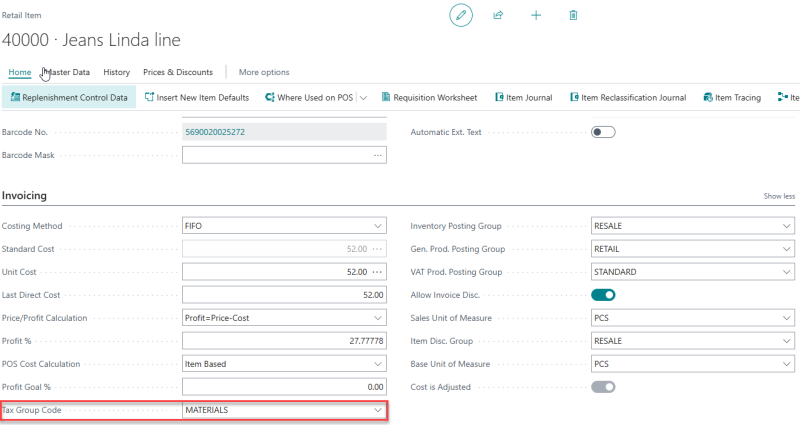
- Tax Group code
A Valid Tax Group Code should be selected for a item
- Tax Posting Setup
A valid tax posting setup matrix with Vat Calculation Type = Sales Tax

See also