Installing on Sandbox / Test / Development (via Partner Portal)
In this article
Prerequisites
Before deploying Shopify BC Connector for LS Central, ensure the following prerequisites are met.
-
Microsoft Dynamics 365 Business Central (v28 and onwards)
-
LS Central (v28 and onwards)
Note: The extension package downloaded from the Partner Portal is intended for deployment to a Sandbox environment in SaaS.
Downloading the Extension
-
You can download the Shopify BC Connector for LS Central Extension code files from LS Retail Partner Portal (login required).
-
Download the provided ZIP file and extract the ZIP file to a local folder. The code files will be available after extraction.
Installation
Deploy the Extension to Business Central
-
Open the Visual Studio Code. Navigate to File – Open Folder and choose the code folder that got from extraction earlier.
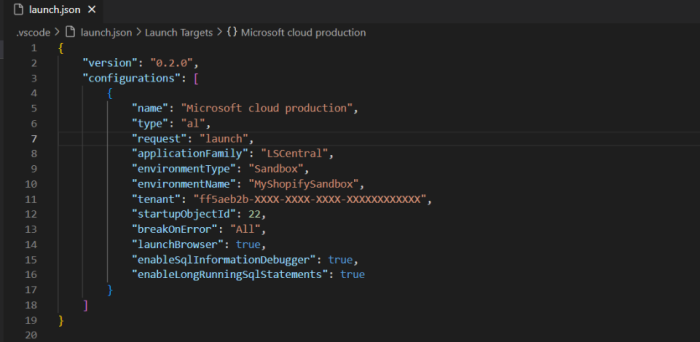
- Add launch.json to .vscode folder and point tenant to your Sandbox environment of LS Central and set the environmentName to your Sandbox environment name.
-
Download Symbols from the Sandbox to test the connection to the sandbox environment and confirm that the correct versions and access are available.
-
Publish the code.
Note: If symbol download fails in VS Code, run AL: Clear credentials cache. This removes cached or expired login data and forces a fresh sign‑in, often resolving authentication-related symbol issues.
Verify the Install
-
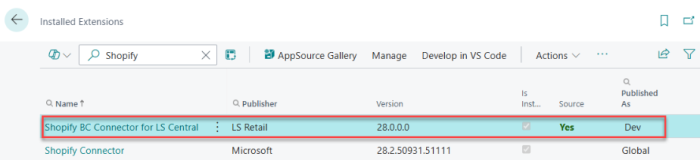
Once deployment is complete, the client will open the browser, and the Shopify BC Connector for LS Central will appear on the Extension Management page.
-
Next, the Shopify BC Connector for LS Central must be configured before using; please refer to the Shopify BC Connector for LS Central – Configuration Documentation for setup instructions.
Installation Video Guide
To assist with the installation process, a short installation video is provided alongside this guide. The video offers a visual walkthrough of the installation steps, including:
The video demonstrates how a partner or customer can:
-
Access the LS Retail Portal
-
Download the Shopify BC Connector for LS Central Extension ZIP file
-
Extract zip file
-
Deploy the extension to Microsoft Dynamics 365 Business Central
-
Verify that the extension is added successfully
The video is intended as a supplementary resource and should be used together with the instructions provided in this installation guide.