Deactivate modules
Before you can run the initial load of the data warehouse you need to review whether there are any modules you want to leave out of the data warehouse. This steps is totally optional and you can keep all the modules if you want to but it can improve the performance and lower the cost of the ETL process pipelines to only run the modules that are needed for the reports your customers want.
There are six modules and they roughly correspond to the Analytics report templates.
- Base - All dimension data for Sales and Inventory and Supply chain reports + fact tables for Sales and ACI reports
- Inventory - No additional dimensions - fact tables for Inventory and Supply chain reports
- Hospitality - Additional dimensions and fact tables used in Hospitality Analytics report
- Bookings - Additional dimensions and fact tables used in Booking Analytics report
- Finance - Additional dimensions and fact tables used in Finance Analytics report
- Hotels - Additional dimensions and fact tables used in Hotel Analytics report
When you setup a new Analytics environment all modules are enabled by default so the best course of action is to disable the modules you do not want to use before the initial load is run. This will prevent the ETL pipelines from checking lookup values for tables that are empty or loading data into tables that are then never shown in any reports.
Lets imagine that you are setting up Analytics for a bookstore. This customer is currently only doing retail and is not using any of the functionality for Bookings, Hospitality or Hotels. You can therefore disable these modules before running the initial load for this customer.
To disable a module you need to run the Enable or Disable Module pipeline from 1 - Query Setup folder in the Azure data factory. You need to run the pipeline for each module, one at a time.
-
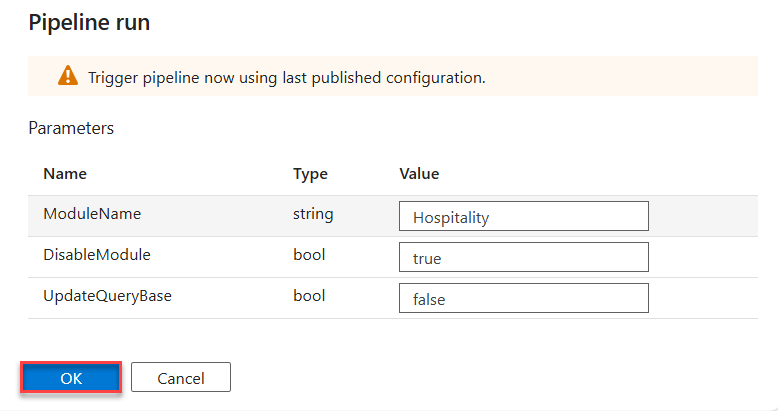
You enter the ModuleName like it is written above, set DisableModule as true and UpdateQueryBase as false. There is no need to update query base at this point since it has not been created yet.
-
You then click OK and the pipeline is run.
-
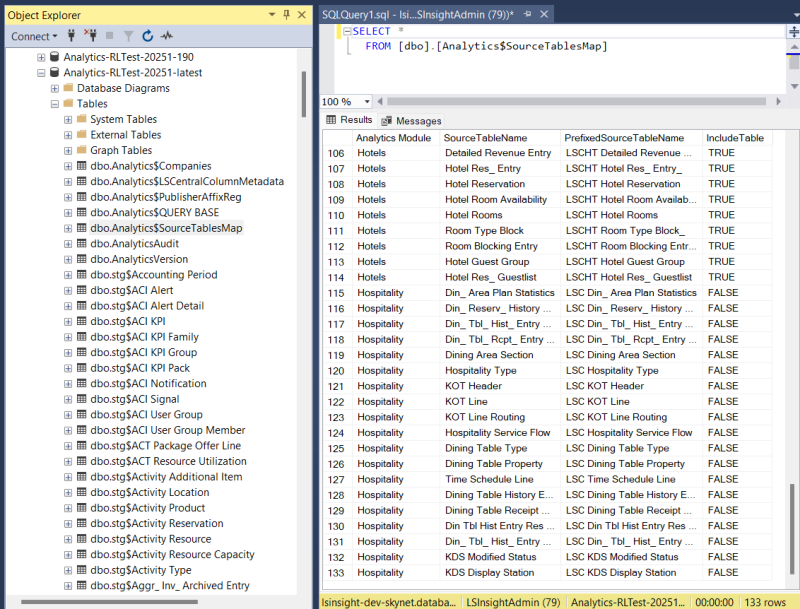
If you check Analytics$SourceTablesMap the data warehouse database you can see that all source tables with Hospitality Module have been set to IncludeTable=False. This means that the module has been disabled and no queries for these tables will be included in Analytics$QUERY BASE so no data will be loaded into staging and fact and dimension tables.
-
You can then repeat this process for the other modules (Bookings & Hotels) you want to disable as well.
Even if you have disabled a module at setup time you can always enable it later on. And if you want to you can keep all modules enabled until you decide otherwise.