About This Release
Released - October 7th 2026
In this version of Analytics for LS Central, we focus on scenario planning for Sales Analytics, easier discovery of the semantic model landscape, more accurate cost and margin figures across Sales, Supply Chain, and Hospitality Analytics, and a new optional module for reporting on LS Central's own system telemetry.
This release adds three new Scenario Analysis pages to Sales Analytics, giving business users a way to model budget, target, and store/product what-if scenarios directly inside the report. The Analytics Data Catalog also gains an interactive Semantic Models Knowledge Graph, letting users visually explore tables, columns, and relationships across every Analytics for LS Central semantic model in a single page.
In addition, a new UOM Quantity column is now available across Sales, Supply Chain, and Hospitality Analytics for customers who need to adjust cost and margin figures for items sold or purchased in a unit of measure other than their base unit, and a new Vendor dimension on Item Ledger Entry enables vendor-level inventory analysis in Inventory, Hospitality, and Supply Chain Analytics.
This release also introduces SystemOps, a new optional module that brings LS Central's own system telemetry into Analytics — job queue execution history, change log history, integration synchronization job history, and database table-growth over time — so partners and customers can monitor platform health alongside their business data.
Explore the key features and updates in version 2026.4 using the links below:
New or Enhanced Features
Sales Analytics: New Scenario Analysis Pages
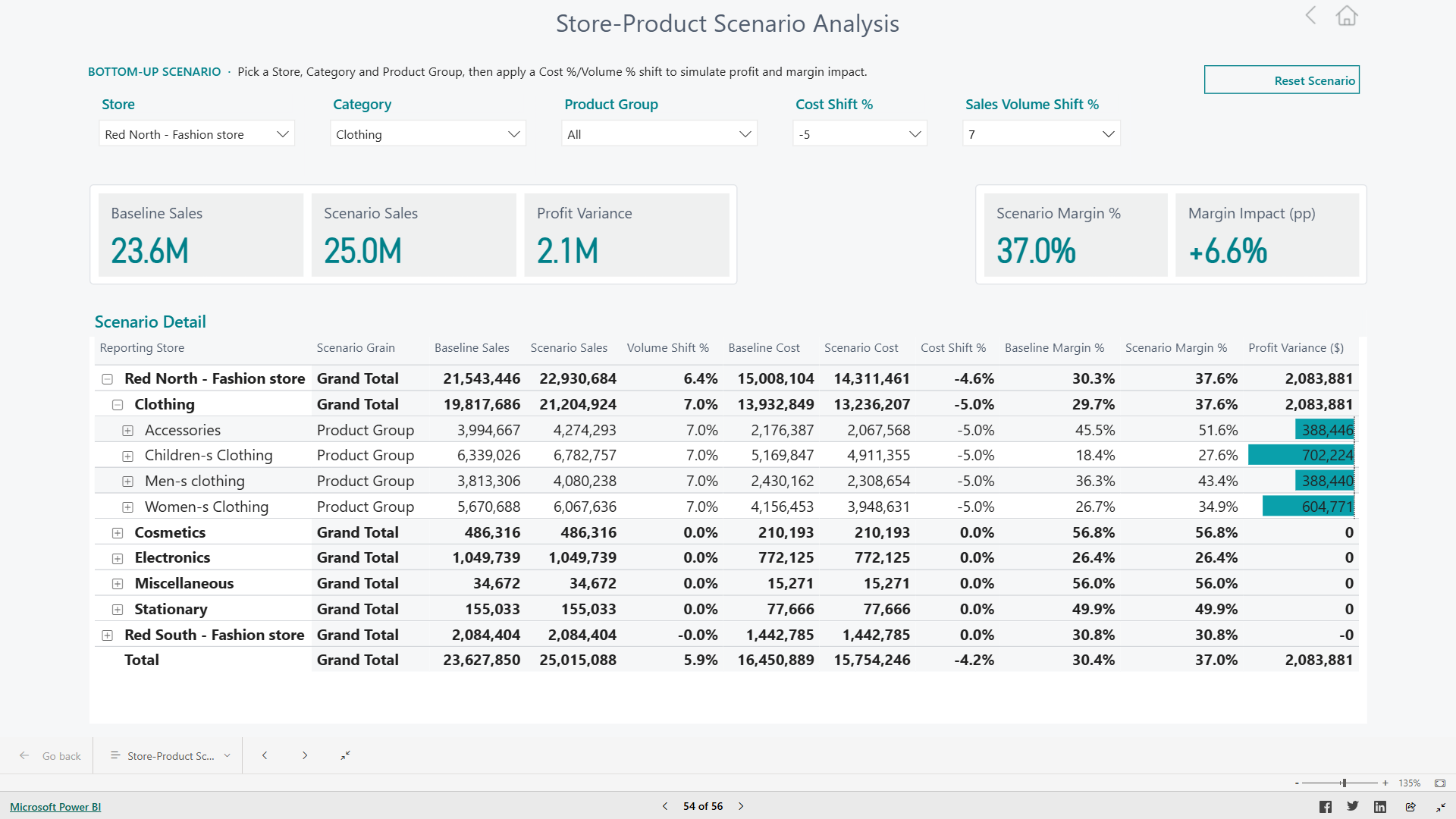
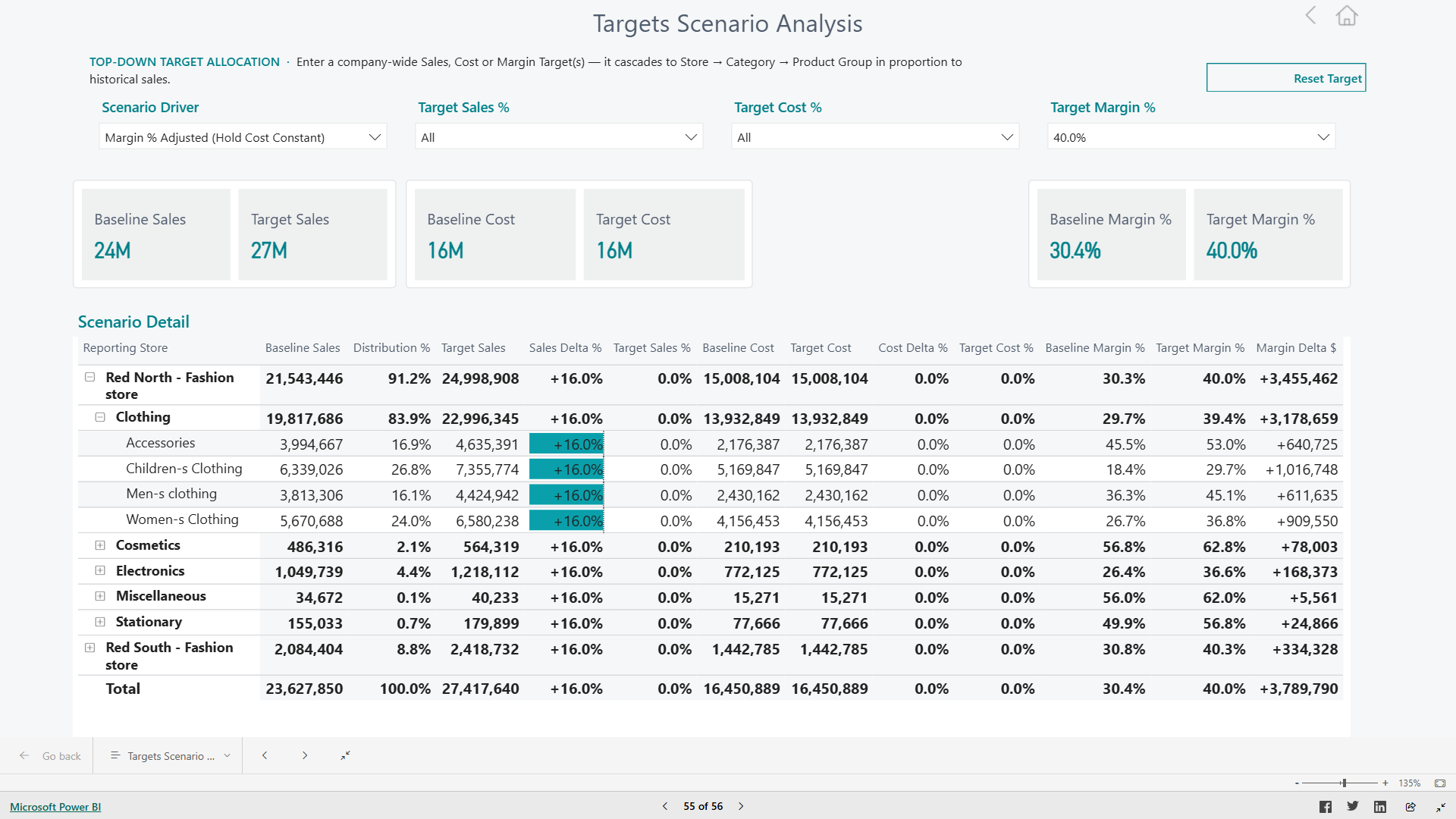
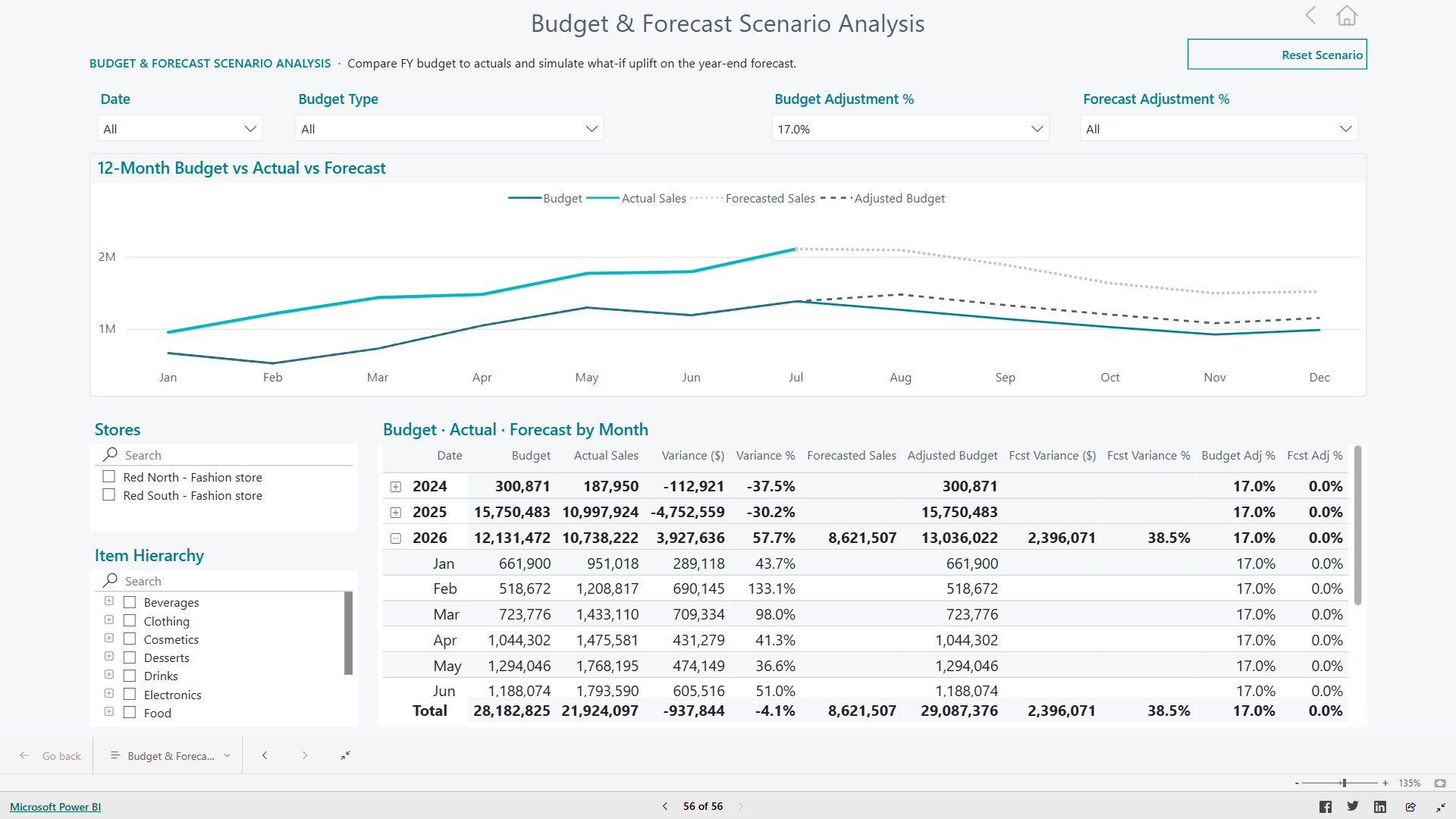
Sales Analytics now includes three new Scenario Analysis report pages that let business users model different sales and budget outcomes directly in the report, without leaving Power BI:
- Budget & Forecast Scenario Analysis — compares budgeted, forecasted, and actual sales so users can gauge performance against plan and adjust expectations for the remainder of a period.
- Targets Scenario Analysis — models sales targets across stores and time periods, helping managers see how realistic a target is based on historical trends.
- Store-Product Scenario Analysis — combines store and product hierarchy selections so users can explore how a change in one area (for example a product category) is likely to play out at a specific store.
All three pages reuse the same validated Sales Analytics data model and measures behind the standard reports, so scenario results stay consistent with the figures reported elsewhere in the product.
Analytics Data Catalog: Semantic Models Knowledge Graph
The Analytics Data Catalog now includes an interactive Semantic Models - Graph page. This knowledge graph visualizes tables, columns, and the relationships that connect them across all Analytics for LS Central semantic models — Sales, Finance, Inventory, Supply Chain, Hospitality, Hotels, and Bookings — in a single explorable view.
Users can navigate the graph to see how a table or column in one report relates to objects in another, making it easier to understand the overall data landscape before building a custom report or extension.
Sales, Supply Chain & Hospitality Analytics: New UOM Quantity Column
A new UOM Quantity column has been added to the Actuals Net Sales table used by Sales Analytics, Sales Analytics es-ES, Supply Chain Analytics, and Hospitality Analytics. This column, sourced from the data warehouse, expresses the sold quantity in the item's base unit of measure rather than the unit of measure used on the transaction line.
The Est. Cost and Est. Net Sales measures in Supply Chain Analytics continue to be calculated using the transaction-line Quantity, unchanged from previous releases. Their column descriptions now point to the new UOM Quantity column as an alternative for customers who sell or purchase items in a unit of measure other than the base unit and want to adjust these calculations themselves.
Note: Using UOM Quantity in a custom calculation only gives an accurate result if the item's Unit Cost and Unit Price are themselves maintained per base unit of measure in LS Central, per the platform's own convention. If your environment maintains these values differently, review your item setup first.
Inventory, Hospitality & Supply Chain Analytics: Vendor Dimension on Item Ledger Entry
A new Vendor field has been added to the Item Ledger Entry fact table, resolved from the item's default vendor. This allows Inventory Analytics, Hospitality Analytics, and Supply Chain Analytics to break down inventory movements — sales, purchases, transfers, and adjustments — by vendor, making it easier to analyze inventory activity and performance per supplier.
New Optional Module: SystemOps
SystemOps is a new optional module for reporting on LS Central's own system telemetry rather than business transaction data. Once enabled, it lets you report on:
- Job Queue execution history — status, duration, and errors for every scheduled job.
- Change Log history — which tables and fields were changed, old and new values, by which user, and when.
- Integration Synch. Job history — inserted, modified, deleted, and failed record counts and duration for each integration sync run.
- Table growth over time — a daily snapshot of per-company table row counts, for tracking database growth trends.
- A full inventory of LS Central objects (type, ID, name, and caption) in the environment.
Like every other Analytics module, SystemOps is disabled by default and must be explicitly enabled. It also requires LS Central version 29.0 or higher.
Note: Two of the six new tables — the BC object inventory and the table-growth snapshot — are sourced from a pair of new tables and a codeunit shipped in LS Central 29.0 itself (accessible from the Analytics Setup page). Before enabling SystemOps, set up a Scheduler Job in LS Central with Object Type Codeunit and Object No. LSC Analytics DB Info Update — otherwise these two tables stay empty. A full-database run took 4–5 hours in LS Retail's own test environment, so plan the job's recurrence accordingly.
Documentation
The FAQ, Troubleshooting & Support page has been expanded with additional frequently asked questions, covering topics such as onboarding a new store or company, hybrid and mixed SaaS/on-premises deployment scenarios, the impact of LS Central upgrades on Analytics, data retention and security, extending reports with custom fields, and how to get help from support.
Setup
Product package
Prestaging table creation scripts
No new prestaging scripts were added.
The incremental update package now also includes the Supply Chain Analytics stored procedures, so partners applying the update script get these changes without a full reinstall. The bc2adls update script has also been simplified — it no longer requires connection parameters to LS Central, streamlining the update process for partners using the bc2adls data export method.
SystemOps module setup (LS Central side)
Enabling the new SystemOps module requires LS Central version 29.0 or higher, which adds the Analytics Objects and Analytics Table Information tables and pages (accessible from Analytics Setup) along with the LSC Analytics DB Info Update codeunit that refreshes them.
Note: These tables do not populate themselves. Set up a Scheduler Job in LS Central (Object Type = Codeunit, Object No. = LSC Analytics DB Info Update) before enabling SystemOps, or the dBCObject and fTableSizeSnapshot tables will remain empty. A full-database run took 4–5 hours in LS Retail's own test environment — plan the job's recurrence accordingly.
Azure Data Factory
Pipelines
Changes in pipelines (classic and bc2adls based)
Seven new pipelines were added for the new SystemOps module, covering the BC object dimension, Job Queue task dimension, change log fact, integration sync fact, Job Queue execution fact, and table size snapshot fact, plus a module gate pipeline. As with every other module, these only run once SystemOps has been enabled.
The master Scheduled Run pipeline now includes a SystemOps step, and the run-completion check now also waits for the Finance module to finish (previously missed) in addition to SystemOps.
Partners upgrading via the incremental update package receive all seven SystemOps pipelines automatically — a full reinstall is not required.
The fInventory pipeline is now disabled by default following the new cost calculation method described below — all pipeline objects remain in place for customers who still want to run it.
Data Warehouse
Database
Tables
Six new tables were added for the SystemOps module:
- dBCObject — a dimension listing every LS Central object known to the environment (type, ID, name, caption).
- dJobQueueTask — a dimension describing each configured Job Queue Entry (recurrence pattern, timeout, retry settings).
- fChangeLog — Change Log Entry history (table/field changed, old and new value, user, timestamp).
- fIntegrationSync — Integration Synch. Job run history (direction, inserted/modified/deleted/failed record counts, duration).
- fJobQueueExecution — Job Queue Log Entry execution history (status, duration, error message).
- fTableSizeSnapshot — a daily snapshot of per-company table row counts, for table-growth trend reporting.
All six follow the standard star-schema conventions used across Analytics — integer surrogate keys seeded at -1, a guaranteed "unknown" member row, and load-tracking columns.
Stored procedures
The following existing procedures were updated in this release:
- factSalesPosted — now populates the new UOM Quantity column, and the underlying item cost adjustment logic (prefactItemCostAdjustment / postfactUpdateAdjustedCost) has been rewritten to calculate adjusted cost at the cost-statement level, more accurately matching how LS Central itself posts a cost adjustment.
- factItemLedgerEntry — now resolves and populates the new SK_Vendor key, using the item's default vendor.
Note: The fInventory pipeline and its underlying objects were not removed and remain available for customers who choose to keep using it, but it is no longer enabled by default.
Reports
Report Updates
Sales Analytics — New Scenario Analysis Pages
Three new report pages Store-Product Scenario Analysis,Targets Scenario Analysis and Budget & Forecast Scenario Analysis have been added to the Sales Analytics report package. See New or Enhanced Features above for details.
Semantic Model updates
One new column was added to the Actuals Net Sales table in Sales Analytics, Sales Analytics es-ES, Supply Chain Analytics, and Hospitality Analytics:
-
UOM Quantity
One new column was added to the Item Ledger Entry table in Inventory Analytics, Hospitality Analytics, and Supply Chain Analytics:
-
Vendor
Analytics Data Catalog — New Semantic Models Knowledge Graph
A new Semantic Models - Graph page has been added to the Analytics Data Catalog report. See New or Enhanced Features above for details.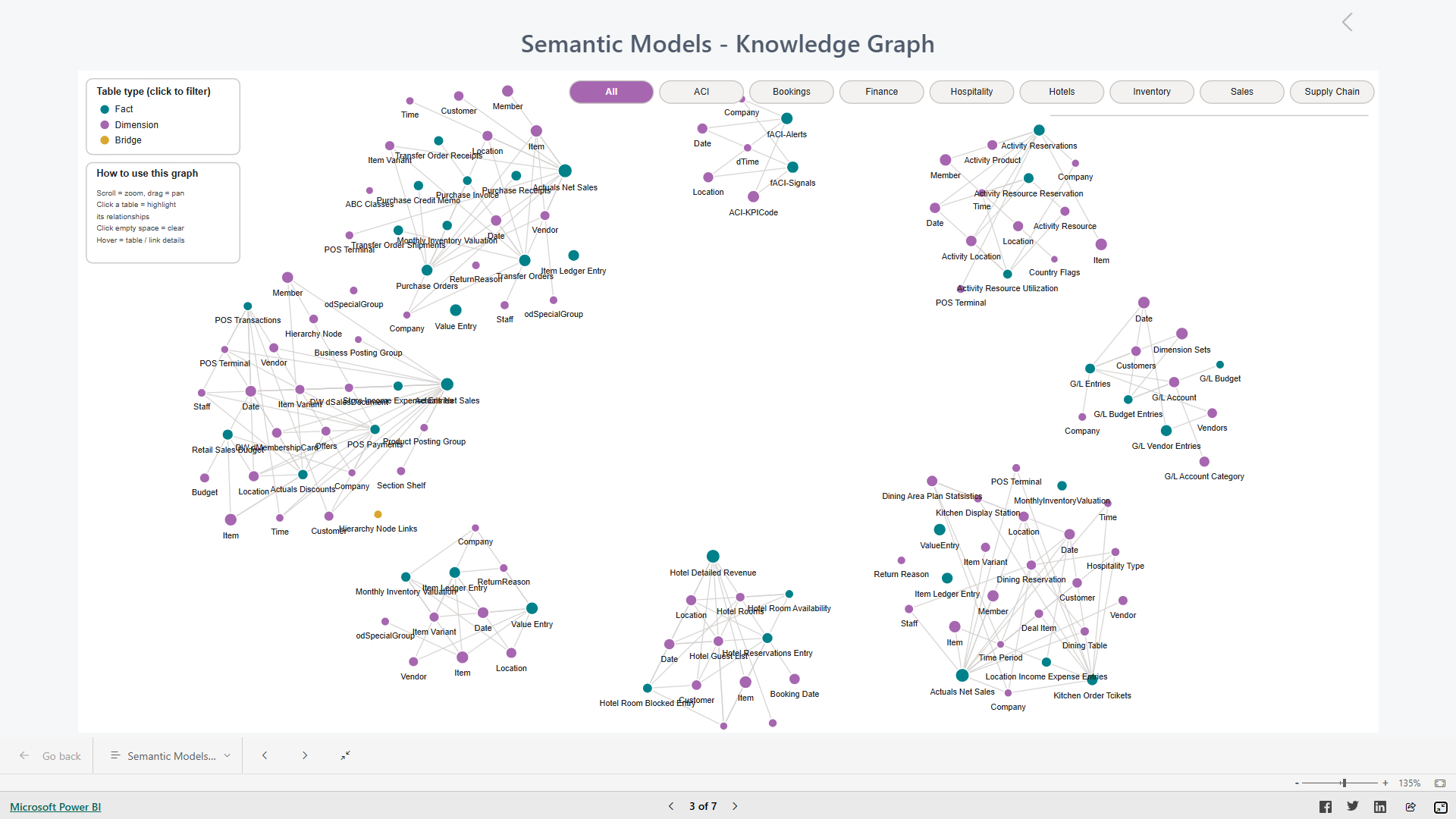
Note: All report pages, underlying procedures, tables, columns, and measures are subsequently reflected at the updated Data Catalog.
Bug fixes
There are no new bug fixes to be communicated in this release.