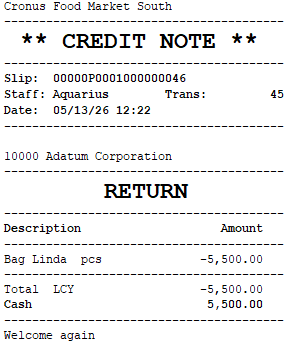
This scenario shows how LS Central handles a return sale at the POS in South Africa and what is printed on the resulting receipt.
Steps at the POS:
- The customer returns an item, and the cashier processes the transaction as a return sale on the POS.
- The cashier selects the customer on the transaction and posts the return.
Receipt output:
- The receipt is printed with the ** CREDIT NOTE ** header above the sales information, in place of the ** TAX INVOICE ** header used for regular sales; see POS Receipt Tax Header.
- The Amount Limit to Print Customer info. threshold applies to regular sales only; on return-sale receipts, the customer's address and VAT Registration No. are not added even when the return amount exceeds the threshold. See POS Transaction Limit Configuration for the threshold field.