This topic describes how a sale that involves a Cashless Debit Card (CDC) is processed at the POS when Product Level Blocking is active. The POS evaluates every item added to the basket and sends a Restricted Items Flag to the PED as part of the payment request.
Sale with non-restricted items only
When the basket contains no restricted (PLB) items, the POS sends the payment request to the PED with the Restricted Items Flag set to False. The PED processes the CDC payment normally.
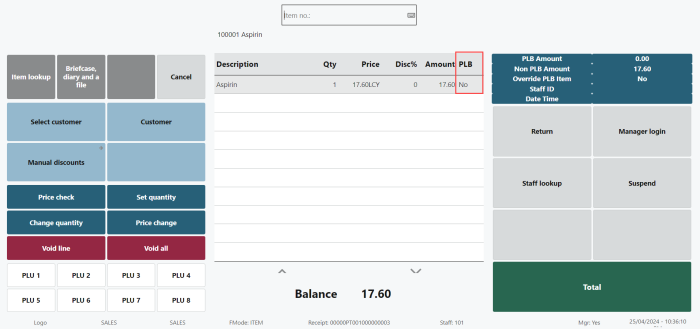
If Enable PLB is turned off, or the store is not marked as a PLB Store, the Restricted Items Flag is always False regardless of the items in the basket. All other PLB functions (such as transaction data upload to the Central Platform) continue to apply.
Sale with restricted and non-restricted items
When the basket contains one or more PLB items, the POS sends the payment request with the Restricted Items Flag set to True. The PED rejects the CDC payment with the message PI, Restricted Items.
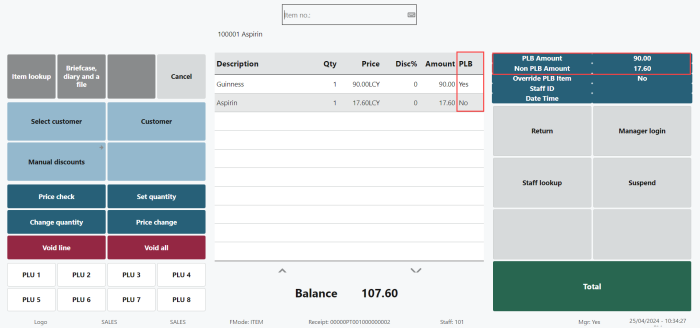
The cashier can resolve the rejection in any of the following ways:
- Remove the restricted items from the basket and tender with the CDC again.
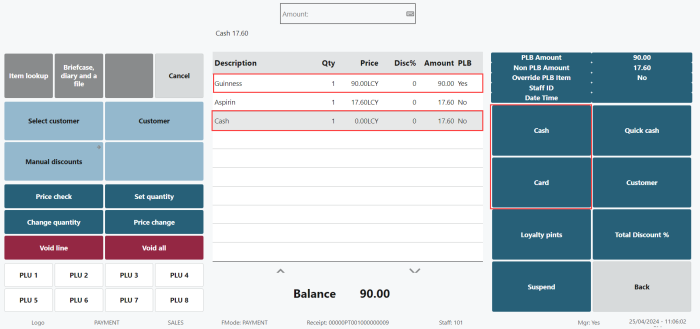
- Tender the non-restricted portion with the CDC and the restricted portion with another tender type (split tender, see below).
- Override the PLB flag for the current transaction, if the item was incorrectly flagged. See Override PLB Item.
- Cancel the transaction.
Example: a basket contains $10.00 of restricted items and $4.00 of non-restricted items. Paying the full $14.00 with the CDC is rejected. The cashier can either remove the restricted items, or take $4.00 on the CDC and $10.00 on another tender.
Split tender
When restricted items are identified, the customer can pay for them with a non-CDC tender while still paying for the non-restricted items with the CDC. The items do not need to be re-scanned.
Item incorrectly flagged as restricted
If an item is flagged as a PLB item in error – for example, a non-restricted item belongs to a product group that is marked as PLB – a manager can override the flag for the current transaction only. The override does not change the master data. For the full procedure, see Override PLB Item.
Voiding lines after a CDC payment
After a CDC payment has been entered on a transaction, the POS prevents the cashier from voiding non-restricted lines if doing so would leave the CDC paying for restricted items. See Void Line Restrictions for CDC Transactions.
See also
Void Line Restrictions for CDC Transactions