About This Release
Released - July 3rd 2026
In this version of Analytics for LS Central, we focus on database performance, storage efficiency, and keeping the product aligned with the evolving Microsoft Power BI platform.
This release introduces two Data Optimization features that together help administrators manage database growth and improve query performance at scale: a new Data Retention field on the Analytics Setup page that controls how long transactional data is kept in the warehouse, and default ROW-level compression now enabled across all staging and fact tables to reduce storage footprint and speed up I/O operations.
In addition, all reports have been updated to replace the deprecated Microsoft Power BI Q&A feature with a new filtering and narrative experience that provides a comparable natural-language interaction model. A new Power BI Guide was also published to help business users get the most out of Analytics for LS Central in Power BI.
A comprehensive FAQ, Troubleshooting & Support resource page was also published, featuring 35+ frequently asked questions, detailed troubleshooting guides with diagnostic SQL scripts, and clear paths to support — designed to help partners and customers resolve issues quickly and independently.
Explore the key features and updates in version 2026.3 using the links below:
New or Enhanced Features
Data Optimization: Analytics Setup Page - Data Retention Field
Analytics now includes a built-in automated data retention mechanism to help control database growth and maintain consistent query performance over time.
A new field, "Days to Keep Data in Analytics", has been added under the General settings section of the Analytics Setup page. Administrators can choose to retain data indefinitely, preserving the full history, or configure automatic purging of transactional data older than a specified number of days. This is particularly useful for high-volume environments where unbounded data growth would otherwise drive up storage costs and slow down query execution.
When a retention value is set, the new DataRetention pipeline in Azure Data Factory handles the cleanup. It reads the "Days to Keep Data in Analytics" parameter from the Analytics Setup page and removes all records older than the specified threshold from the relevant staging and fact tables. A value of 0 disables purging entirely — no data will be deleted. The pipeline relies on the four new stored procedures introduced in this release to carry out the deletions.
Important: The DataRetention pipeline is not enabled by default and must be activated manually in Azure Data Factory. This is intentional — it ensures that no data is deleted unless an administrator has explicitly reviewed and confirmed the retention configuration in the Analytics Setup page.
For further information, please navigate to the Analytics Setup in LS Central page.
Data Optimization: Default ROW-Level Compression
To improve database performance and manage storage costs more effectively, ROW-level compression is now enabled by default for all staging and fact tables in the Analytics for LS Central database.
This change takes effect automatically upon upgrade and requires no manual configuration.
Key Benefits:
- Reduced Storage Footprint: Data types such as integers, decimals, and characters are stored using only the minimum bytes required, leading to significant space savings across the database.
- Improved I/O Performance: Smaller table sizes mean fewer data pages need to be read from disk into memory, speeding up query execution times across all reports and pipelines.
- Low CPU Overhead: Unlike heavier compression methods such as PAGE compression, ROW-level compression requires negligible CPU cycles to compress and decompress data, making it well suited for high-frequency write environments like staging tables.
Integration with ADF and Power BI:
This optimization is applied entirely at the storage engine layer and is completely transparent to external applications. It has no impact on how Azure Data Factory (ADF) and Power BI interact with the database. All existing ADF data extraction pipelines and Power BI report queries will continue to function exactly as before, with a more efficient backend footprint.
Important Recommendation: To ensure the database maintains peak efficiency and that compressed data pages do not become heavily fragmented over time, we strongly recommend scheduling and running the database maintenance pipeline on a regular basis.
Documentation
Analytics Setup in LS Central has been updated with information on the new Data Retention feature.
A new Analytics - Power BI Guide has been added. This is a practical guide aimed at business users who are new to Power BI, covering navigation, filters, measures, data models, and data transformation in the context of Analytics for LS Central.
A new FAQ, Troubleshooting & Support page has been published. This comprehensive resource page provides 35+ frequently asked questions covering licensing, setup, Power BI, data, and compatibility; detailed troubleshooting guides with diagnostic SQL scripts for common errors including MERGE failures, staging duplicates, and data discrepancies; and clear guidance on when and how to contact LS Retail Support. Partners and customers can use this page as their first stop for self-service problem resolution.
Setup
Product package
Prestaging table creation scripts
No new prestaging scripts were added.
Azure Data Factory
Pipelines
Changes in pipelines (classic and bc2adls based)
One new pipeline was added for Retention:
- Data Retention
Data Warehouse
Database
Tables
No new tables were added.
Stored procedures
Four new stored procedures were added for Retention:
- AnalyticsPurgeOldSalesData
- AnalyticsPurgeOldPurchaseData
- AnalyticsPurgeOldHospitalityData
- AnalyticsPurgeOldTransferData
One new stored procedure was added for Item dimension:
- v25dimMergedItem
Note: It is only triggered if the new Hard Attribute columns are available in the staging table, otherwise it will fallback to the older version of the procedure which uses the old Hard Attribute columns.
Reports
Report Updates
Q&A Page Updates (All Reports)
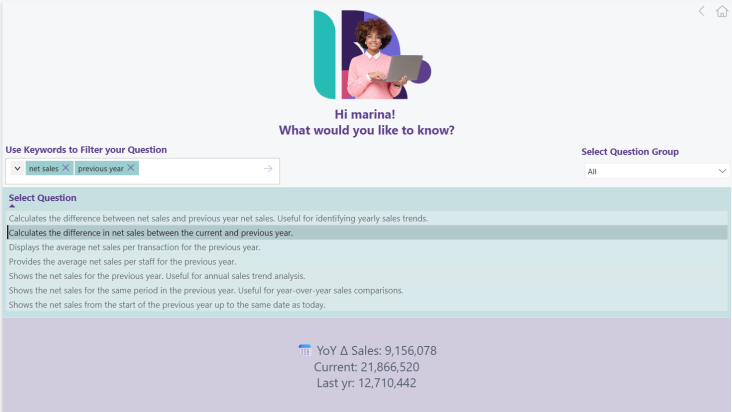
Microsoft has officially deprecated the Power BI Q&A feature. As a result, we have updated the Q&A page in all Analytics for LS Central reports. The updated page replaces the native Q&A visual with a combination of Text Filtering visuals and Narrative visuals, delivering a comparable experience that allows users to explore and query their data using natural language-style inputs, while remaining fully supported by Microsoft going forward.
This update applies to every report in the Analytics for LS Central product package. No action is required from administrators beyond upgrading to version 2026.3.
New Power BI Guide
A new Analytics - Power BI Guide was published as part of the Analytics for LS Central documentation. This practical guide is designed for business users who are new to Power BI and covers the core concepts needed to work effectively with the Analytics reports, including navigation, filtering, measures, data models, and data transformation.
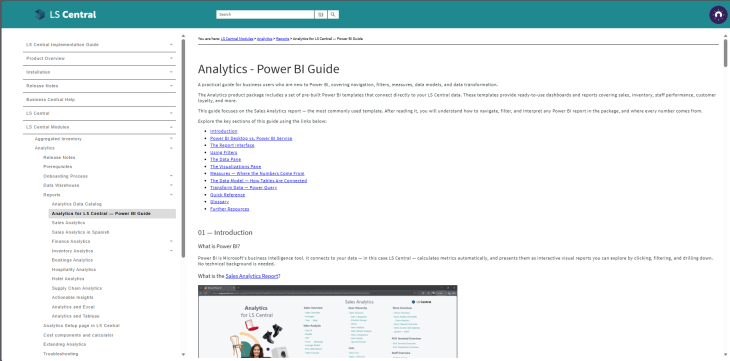
The guide is also available in a short video format on YouTube.
Bug fixes
There are no new bug fixes to be communicated in this release.