LS Central SaaS with bc2adls export and Analytics in
In the image below you can see the flow of the data in the new staging process that uses data exported by the bc2adls app. This app is a third party open source app managed by a community of developers and it has recently been added to App source for download and installation. We highly recommend using the app from App source if possible (for version 27 and later) since that will allow updates of the app through the LS Central SaaS admin portal.
In the onboarding wizard we offer you to either download a version of the app that has been tested with the latest version of BC and was built by the Analytics team or to get the app from App source. If you choose to build your own version of the app and install that in BC then make sure there are not breaking changes between the version used by us, the app source version and the one you build.
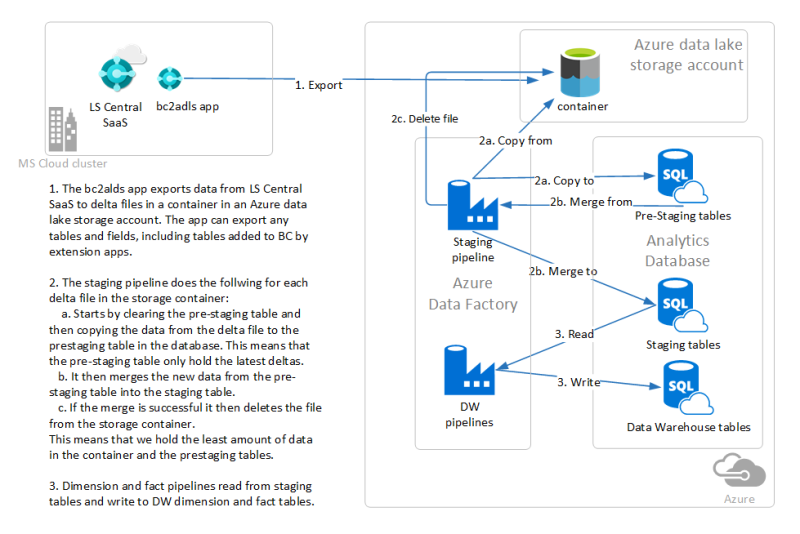
This setup wizard will go through the steps needed to set up the bc2adls app in LS Central SaaS and configure the export to Azure data lake storage and the process of creating an instance of Analytics in Azure. SQL server, SQL database, and Azure Data Factory pipelines are used to move data from the exported files into the pre-staging tables, from pre-staging into the staging tables and from the staging tables to the data warehouse tables.
First, you have a few preparation steps to do. Then, you move on to the setup of Analytics resources in Azure by logging into Azure using the deployment script, and the last steps show how the Power BI report templates are connected to the Analytics database.
Once you have gone through the wizard you can consult this page for special operating procedures when Analytics is setup using data exported with bc2adls as a source.