When you select UAE in the Planet Tax Country field on the Planet Tax Setup page, the page displays the fields required for the UAE tax-free process.
Use this setup to enter the Planet service URLs, set the minimum refund amount, and define date format and behavior options for UAE processing.
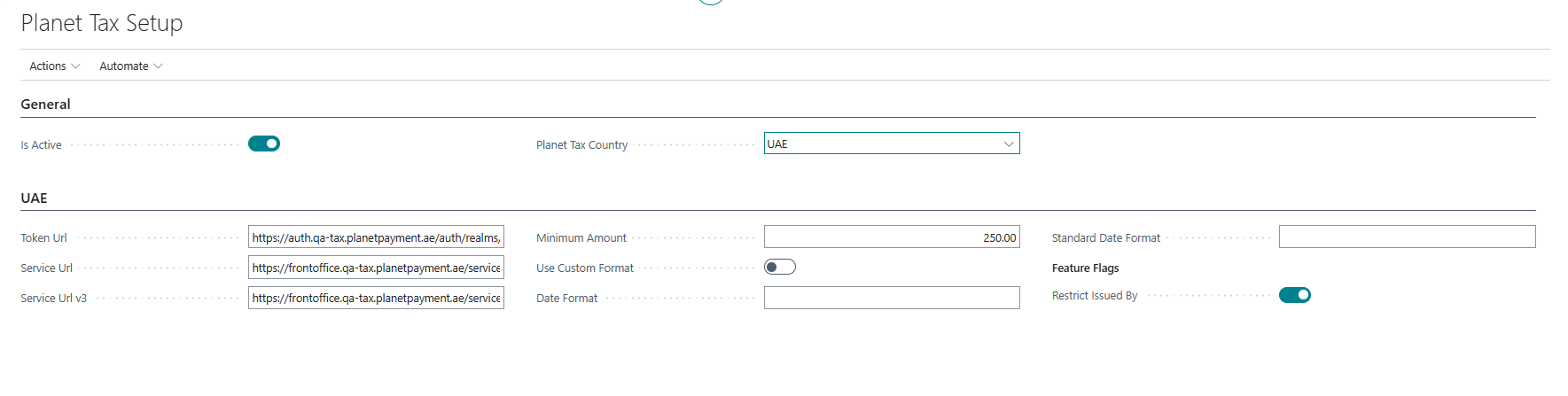
UAE FastTab
| Field | Description |
|---|---|
| Token Url | Specifies the URL used to request authentication tokens from Planet. |
| Service Url | Specifies the URL of the Planet service used to process tax-free transactions. |
| Service Url v3 | Specifies the URL of the Planet service using the v3 API, if required by your Planet contract. |
| Minimum Amount | Specifies the minimum purchase amount required to qualify for a VAT refund in the UAE. |
| Use Custom Format | Specifies whether custom date formatting should be used when sending dates to Planet. |
| Date Format | Specifies the custom date format applied when Use Custom Format is enabled. |
| Standard Date Format | Displays the standard Planet date format used when a custom format is not applied. |
| Restrict Issued By | When enabled, the shopper's Document Issued By country must match the Nationality country. This option keeps shopper data consistent with the requirements of the current Planet Tax service version. |
Additional functionality
To access additional functionality, select Action > Processing.
| Action | Description |
|---|---|
| Logs | Displays the log of requests sent to, and responses received from, Planet. |
Country/Region ISO Alpha-3 Code
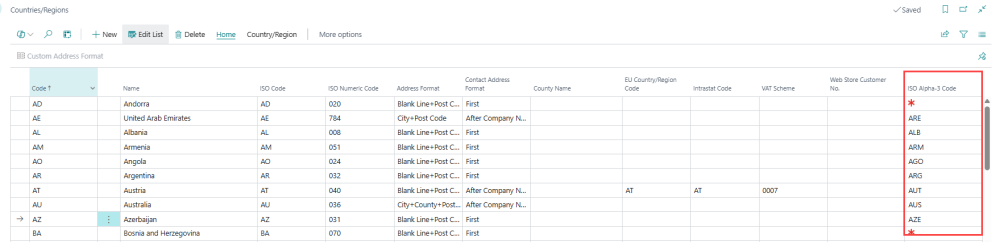
For UAE shopper processing, each Country/Region record used for Nationality, Country of Residence, or Document Issued By must have the ISO Alpha-3 Code field populated.
The ISO Alpha-3 Code is a three-letter country code that the Planet Tax service requires for shopper data. When a cashier scans a travel document at the POS, the system reads the three-letter country codes from the MRZ and uses the ISO Alpha-3 Code field to look up the corresponding two-letter ISO code used by LS Central. If the ISO Alpha-3 Code is not filled in, country codes from scanned documents cannot be resolved correctly.
To fill in the ISO Alpha-3 Code for each relevant country:
- Click the
 icon, enter Countries/Regions, and select the relevant link.
 - For each country used as Nationality, Country of Residence, or Document Issued By, enter the three-letter ISO 3166-1 alpha-3 code in the ISO Alpha-3 Code column.
- Close the page when all relevant countries have been updated.
Note: The ISO Alpha-3 Code field is mandatory for correct operation of the travel document scanning feature. Entries without this value may cause errors during shopper registration.