When a return is initiated at the POS for a transaction that includes a Planet Tax Free voucher, LS Central validates the store's Tax Return Service setup before processing the return.
The store must have all Tax Return Service fields configured on the Store Card. If any required value is missing, the return cannot be completed. These fields let LS Central authenticate with Planet using the credentials supplied to the store.
Set up the Tax Return Service on the Store Card
- Click the
 icon, enter Store List, and select the relevant link. and open the relevant store.
 - Open the Tax Return Service FastTab.
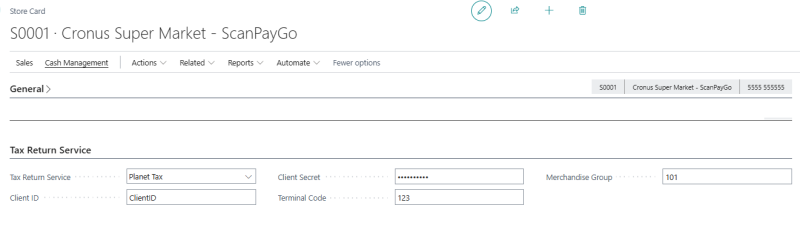
- In the Tax Return Service field, select Planet Tax.
- Enter the following credentials provided by Planet:
- Client ID
- Client Secret
- Terminal Code assigned to the store
- Merchandise Group code
When the return of a tax-free transaction is completed, the related Planet voucher is automatically voided.