To use Planet Tax Free functionality on the POS, the required POS external commands must be registered in LS Central. How the commands are made available depends on the region:
- Europe: Register the commands manually by running codeunit 71078825 LSCTRI POSCommandRegistration from the POS External Commands page.
- UAE: The commands are created automatically when the Planet Tax Free extension is installed. No manual registration is required.
After the commands are registered, assign them to POS buttons in the relevant POS menu profile.
Register Europe POS commands
- Click the
 icon, enter POS External Commands, and select the relevant link.
 - Choose the Register action.
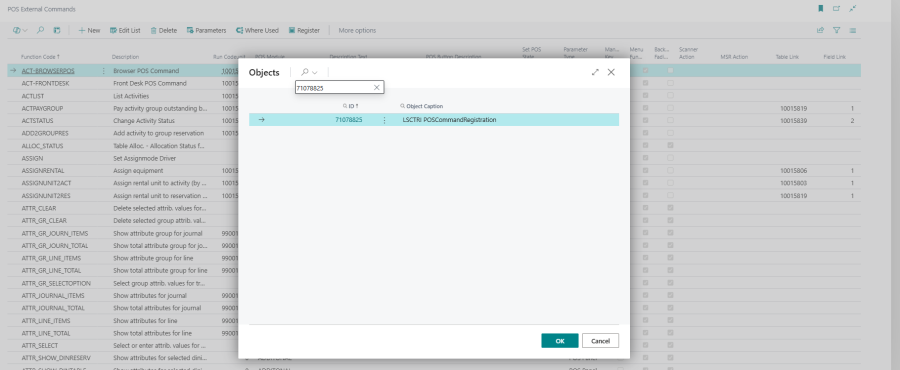
- In the Codeunit ID field, enter 71078825 (LSCTRI POSCommandRegistration).
- Choose OK to confirm.
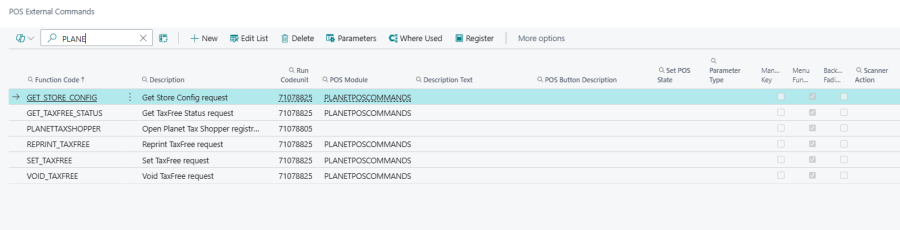
After registration, the following POS commands become available for assignment to POS buttons.
| Command | Description |
|---|---|
| GET_STORE_CONFIG | Retrieves the store configuration from Planet. |
| GET_TAXFREE_STATUS | Retrieves the Tax Free status for the selected transaction. |
| SET_TAXFREE | Sends a request to set the Tax Free status. |
| GET_SUPPORT | Sends a support request to Planet for the configured store. A reply URL is returned on the Hardware Station, which the user can open to view the response. |
| REPRINT_TAXFREE | Reprints the selected Tax Free voucher. |
| VOID_TAXFREE | Voids the selected Tax Free voucher. |
UAE POS commands
In a UAE environment, all of the Europe commands listed above are also available, plus the UAE-specific shopper and refund commands below. None of the UAE commands require manual registration — they are added automatically when the Planet Tax Free extension is installed. Assign the commands to POS buttons as required.
| Command | Description |
|---|---|
| PLANETTAXSHOPPER | Opens the Planet Tax Shopper panel where the cashier enters or scans the shopper's details before completing a tax-free sale. |
| REGISTERSHOPPER | Confirms the shopper registration from the Planet Tax Shopper panel and attaches the shopper to the current transaction. |
| CANCELREGISTERATION | Cancels the current shopper registration and clears the shopper data from the transaction. |
| SHOPPERDOCUMENTTYPE | Opens the document type selector so the cashier can choose the shopper's document type (PASSPORT or ID_CARD). |
| CANCELTAXREFUND | Cancels an issued tax refund for the selected transaction. The refund must be in the Requested state. |