When a transaction is registered while the POS is in training mode, LS Central prints a Training Receipt. The receipt is clearly marked so it can never be mistaken for a settled sale, in accordance with the Norwegian cash register regulation.
When the Training Receipt prints
The Training Receipt is printed automatically when the posted transaction has the Entry Status Training. Training mode is enabled per terminal or per staff according to your POS setup; refer to the standard LS Central POS configuration for details.
What the receipt looks like
The receipt header includes two extra lines above the normal sub-header:
- TRAINING RECEIPT — identifies the document as a non-fiscal training document.
- NOT A — printed immediately below, signalling that the document is not a real sales receipt.
The receipt body then contains a Train : line that prints the sequential Training No. assigned to the transaction:
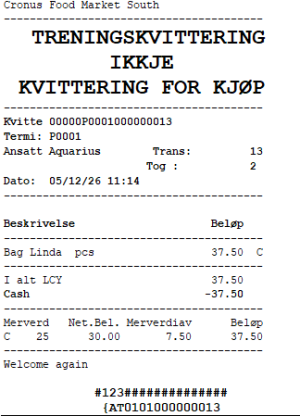
Training No. sequence
Each training receipt receives a unique, sequential Training No. per store and POS terminal. The number is assigned when the transaction is posted and is stored on the Transaction Signature record. It increments by one for every new training transaction on the same terminal.
Reporting
Training receipts are included in the SAF-T Cash Register export with the trainingID element set to true, allowing the tax authority to identify and exclude them from fiscal totals.
See also
Delivery Receipt (Credit Sale)