How to: Configure POS to Block Sales When the Drawer Is Open
In NO localization, you can configure POS to block sales when the drawer is open.
Important
- The client session variable #OPENDRAWERBLOCKSALE is no longer supported.
- Use the POS Drawer Card setup to control this behavior.
When enabled, POS is completely disabled while the drawer status is Open.
To configure POS to block sales when the drawer is open
- Click the
 icon, enter POS Drawer List and select the relevant link.
 - In the General FastTab:
- Enable Drawer Alert if Open.
- Set Drawer Alert Type to Block.
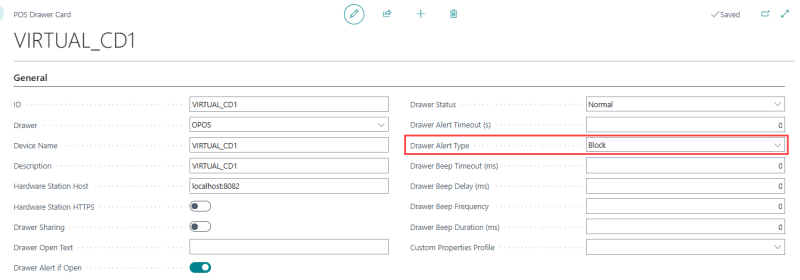
When these settings are enabled, the system blocks POS activity if the drawer status is Open.
If configuration is missing in NO localization
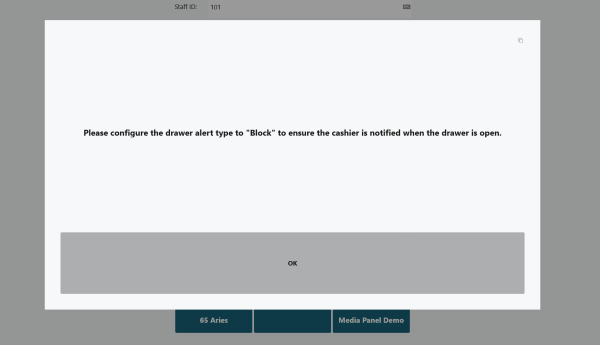
If Drawer Alert Type is not set to Block, the POS displays a warning message:
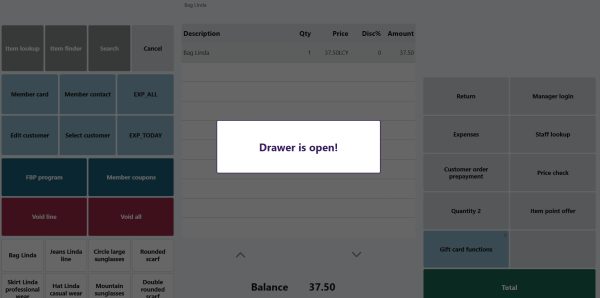
In addition, when the drawer remains open, the cashier sees a notification such as:
Note: This configuration check applies only when a cashier logs in for a normal sales session. It is skipped when logging in for an End of Day (EOD) or tender-declaration operation, so the drawer being open does not block starting the cash count or float entry. However, once a Tender Declaration transaction is posted, the system re-checks the drawer's open/closed status and still shows the drawer-open notification above if the drawer remains open at that point.