The Tax Group Limitation feature lets you restrict a store to a single tax group. When a limitation is set, all POS transactions at that store must use that tax group; any line item with a different tax group is blocked.
This is useful when a store sells only one category of goods (for example, a store that sells only non-taxable items, or one that exclusively sells food-stamp-eligible products).
How It Works
The limitation is configured per store. When the POS processes a transaction line, it checks whether the store has a Tax Group Code (Limitation) set. If it does, only items belonging to that tax group can be added to the transaction.
Set Up a Tax Group Limitation
- Click the
 icon, enter Store List and select the relevant link.
 - Go to the Statement/Closing FastTab.
- In the Tax Group Code (Limitation) field, enter the tax group code to restrict this store to.
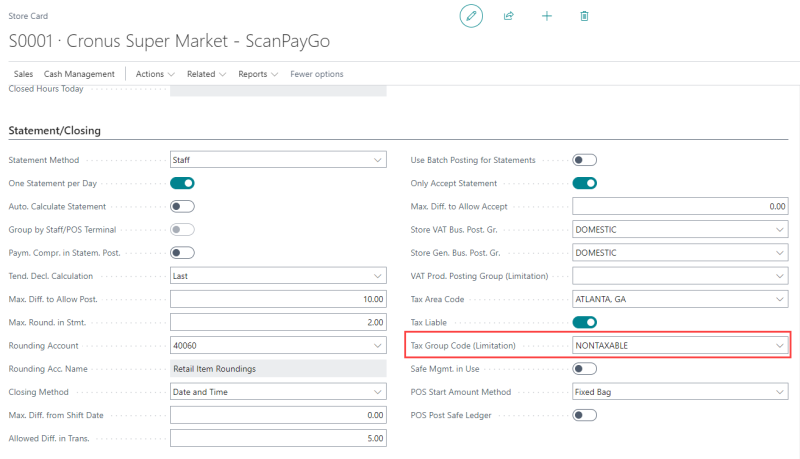
Note: Leave the field blank to allow all tax groups (no restriction). This is the default for most stores.
| Rule | Detail |
|---|---|
| Food Stamp change tender | The Change Tend. Code on a Food Stamp tender must point to a cash tender type. Non-cash change is not allowed. |
| Food Stamp keyboard entry | Keyboard Entry Required must be enabled on Food Stamp tenders. |
| Overtender/Undertender | Cannot be enabled on Food Stamp or WIC tenders without satisfying WIC compliance checks. |
Related Fields on the Store Card
| Field | Description |
|---|---|
| Tax Area Code (LSCNA) | The tax jurisdiction for this store. Required for any tax calculation. |
| Tax Liable (LSCNA) | When enabled, transactions at this store are subject to tax. Disable only for tax-exempt store locations. |
| Tax Group Code (Limitation) (LSCNA) | Optional. When set, restricts transactions to this tax group only. |
| VAT Prod. Posting Group (Limitation) (LSCNA) | Specifies the VAT Product Posting Group for limitation tax exempted in POS Trans. Line. |
Example
A store sells only non-taxable grocery items. The store's tax group code for those items is NON-TAXABLE. Setting Tax Group Code (Limitation) to NON-TAXABLE ensures no taxable item can accidentally be rung up at that store.
Related Topics