Every e-Invoice line submitted to the IRBM must include a unit of measure code that follows the UN/ECE Recommendation 20, Revision 17 (2021) standard. The MY ClearTax integration reads this code from the International Standard Code field on the Unit of Measure card. The integration modifies the standard lookup on this field so that only codes from the Unit Code data type in the Data Catalog can be selected.
If an individual unit of measure does not have an International Standard Code set, the integration falls back to the default unit code configured in E-Invoice Setup. See E-Invoice Setup.
Unit codes are maintained in the Data Catalog under the Unit Code data type. See E-Invoice Catalogs.
To set the International Standard Code on units of measure:
- Click the
 icon, enter Units of Measure, and select the relevant link.
 - Open the relevant unit of measure card.
- In the International Standard Code field, select the appropriate code from the Unit Code data type in the Data Catalog.
- Repeat for all units of measure used in your item and transaction lines.
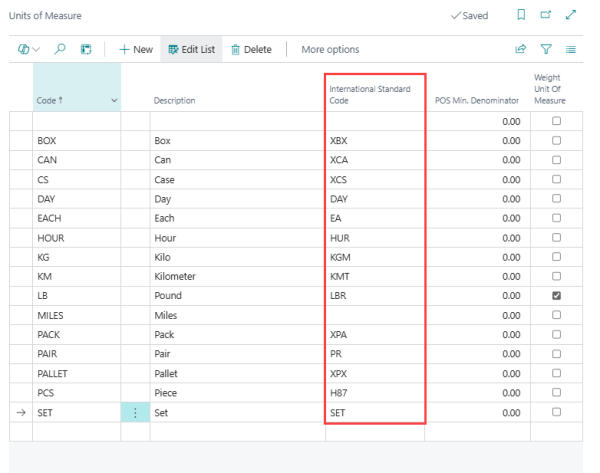
Field reference
| Field | Description |
|---|---|
| International Standard Code | The UN/ECE Recommendation 20 unit code for this unit of measure (for example, C62 for Each, KGM for Kilogram). The MY ClearTax integration restricts the lookup to codes from the Unit Code data type in the Data Catalog. |
See also