Every e-Invoice submitted to the IRBM must include a payment mode code identifying how the transaction was paid. The MY ClearTax integration reads this code from the Payment Mean Code field on each tender type. Tender types that do not have a Payment Mean Code set are included in the e-Invoice without a payment mode code, which may cause a validation error from ClearTax.
Payment mode codes are maintained in the Data Catalog under the Payment Mode data type. See E-Invoice Catalogs.
To set the Payment Mean Code on tender types:
- Click the
 icon, enter Tender Type Setup, and select the relevant link.
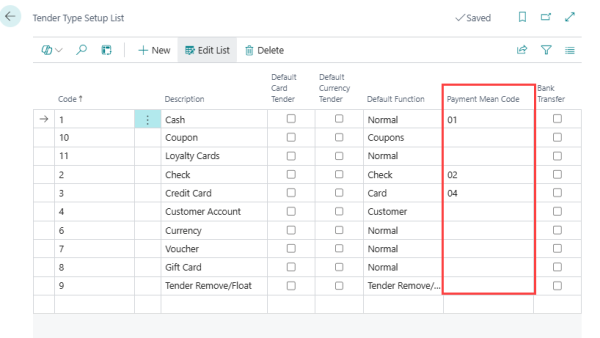
 - For each tender type in the list, locate the Payment Mean Code column.
- Select the appropriate code from the Payment Mode data type in the Data Catalog.
- Repeat for all tender types used in your stores.
Field reference
| Field | Description |
|---|---|
| Payment Mean Code | The payment mode code from the Payment Mode data type in the Data Catalog. Maps the LS Central tender type (cash, credit card, e-wallet, etc.) to the corresponding code required by the IRBM e-Invoice schema. The field is added by the MY ClearTax integration and appears after the Default Function column on the Tender Type Setup list. |
See also