To configure price tax and posting on the Item Card:
- Click the
 icon, enter Items and select the relevant link.
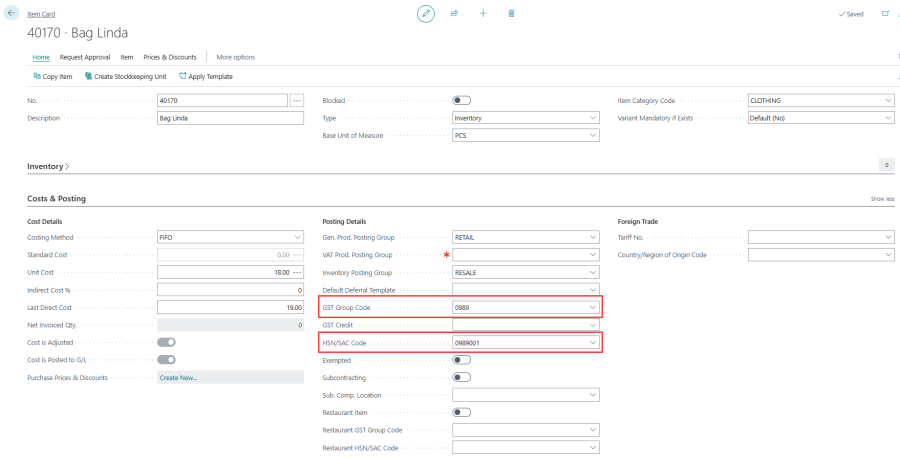
 - On the Costs & Posting FastTab, assign a GST Group Code for each inventory item based on its tax rate. Also, assign an HSN/SAC Code for goods/services in the item and service master data.
Note: An item cannot have both VAT and GST calculations. You must leave either the GST Group Code or the VAT Prod. Posting Group field blank.
During sales transactions, the POS uses the assigned GST Group Codes, and HSN/SAC Codes to calculate and apply the correct GST rates.
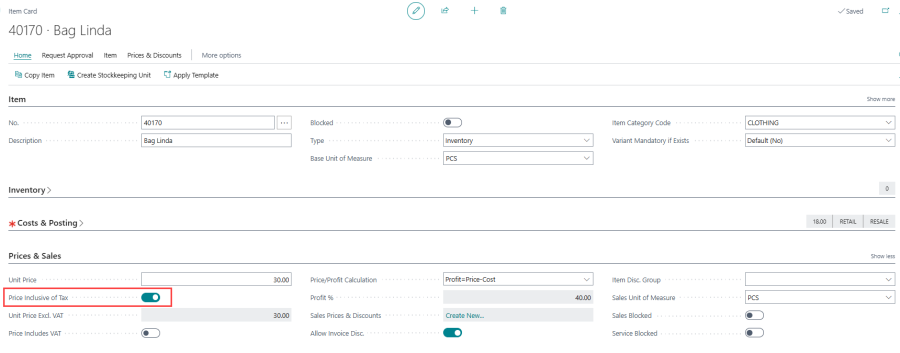
- For each item, specify whether the price is inclusive or exclusive of tax.
- On the Prices & Sales FastTab, if the item price includes tax, enable the Price Inclusive of Tax toggle. This ensures the unit price of the item already includes tax.
Restaurant GST Fields
Items sold through the restaurant (dine-in) channel can use a different GST classification from the standard retail sale. The following fields on the Item Card (and Retail Item page) control restaurant-specific tax behaviour:
| Field | Description |
|---|---|
| Restaurant Item | Flags the item as a restaurant item. When enabled, the system uses the restaurant GST group and HSN/SAC codes for all sales of this item, regardless of the sales channel. |
| Restaurant GST Group Code | Separate GST Group Code used when the item is sold through the restaurant (dine-in) channel. Typically a Services group (for example, 18% Restaurants), different from the standard retail GST group. |
| Restaurant HSN/SAC Code | HSN/SAC Code for restaurant sales. This field is filtered by the Restaurant GST Group Code. Common codes for restaurant services are 996331 and 996332. |
Note: The restaurant HSN/SAC Code must be different from the standard HSN/SAC Code if both are configured on the same item.
For more information about configuring items for restaurant sales, see Restaurant and Hospitality GST.