To configure a customer in LS Central IN:
- Click the
 icon, enter Retail Customer, and select the relevant link.
 - Create a new customer, or select an existing customer.
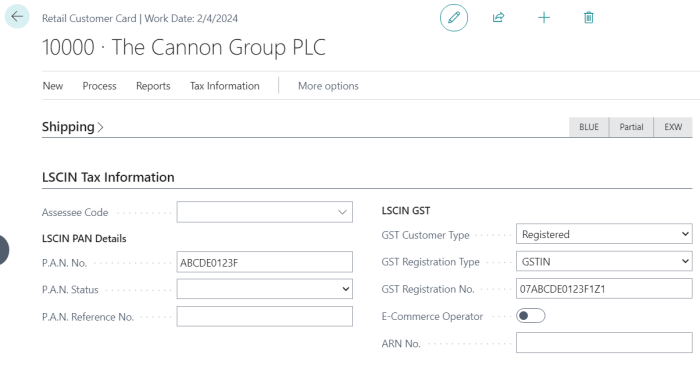
- Enter the necessary information in the provided fields:
- Assessee Code: Applicable for TCS tax type.
- PAN No.: Enter a valid PAN number.
- GST Customer Type: Specify the type of customer for GST purposes.
- GST Registration Type: Indicate the registration type for GST.
- GST Registration No.: Enter the customer's GST registration number.
- E-Commerce Operator: If applicable, specify the e-commerce operator associated with the customer.
- Save the customer record.
How GST Customer Type affects GST calculation at POS
The GST Customer Type on the customer record is passed to the Tax Engine, together with the Nature of Supply, as an input when GST is calculated for a POS sale. The Tax Engine's use case tree (configured under GST Setup) maps each combination of these values to the applicable CGST/SGST/IGST rates, so the practical effect of most GST Customer Type values depends on how the use cases are configured for your company. The table below summarizes the values available on the customer record.
| GST Customer Type | Effect on GST calculation |
|---|---|
| Registered | A registered, GSTIN-holding business customer. Standard CGST/SGST (intra-state) or IGST (inter-state) rates apply, based on the use case configuration for the item's GST Group. Selecting a customer with this type automatically sets the transaction's Nature of Supply to B2B. |
| Unregistered | A customer without a GST registration. Standard GST rates still apply through the use case configuration; the transaction is treated as a consumer (B2C) sale for Nature of Supply purposes. |
| Consumer | An end consumer. Standard GST rates apply through the use case configuration; the transaction is treated as a B2C sale for Nature of Supply purposes. |
| Export | A customer outside India. GST treatment for export sales is determined by the use case configuration for this customer type. |
| SEZ Unit, SEZ Developer | Supplies to a Special Economic Zone (SEZ) unit or SEZ developer are zero-rated under Section 16(1) of the IGST Act. GST is calculated at 0% for these customer types. This zero-rating is encoded directly in the Tax Engine use cases for the SEZ customer types, so no additional GST Group or rate configuration is required to achieve it. |
Note: SEZ Unit and SEZ Developer customers are also GST-registered entities, but the automatic B2B classification of Nature of Supply only triggers when GST Customer Type is set to Registered. SEZ customers therefore remain categorized as B2C for Nature of Supply. This does not change the GST amount charged (it is zero either way, since SEZ supplies are zero-rated), but it can affect how the transaction is categorized on GSTR returns. If your GSTR filing requires SEZ supplies to be reported as B2B, verify the Nature of Supply on transactions for SEZ customers before filing.