- Click the
 icon, enter BE Localization Setup, and select the relevant link.
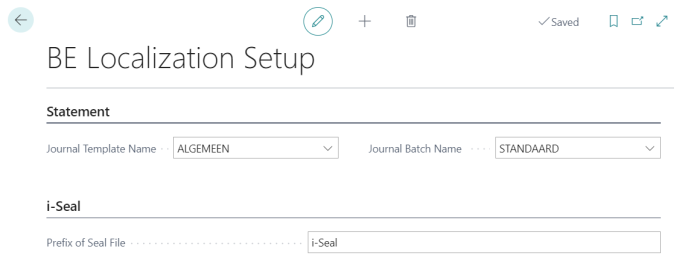
 - Navigate to the Statement FastTab and complete the following fields:
- Journal Template Name: Specify the template to be used for journal entries.
- Journal Batch Name: Define the batch name for processing journal entries.
- In the i-Seal FastTab, enter a value in the Prefix of Seal File field. This prefix is used in the file name of every Seal File generated by the system and helps you identify and organize the exported files.
Note: The Prefix of Seal File is required. If it is blank and a POS terminal has seal functionality enabled, the POS displays an error when a cashier starts a sale and the transaction does not open. Make sure this field is filled in before going live.