To be able to use Google Inventory, you need to have Merchant Account and Stores in your Google setup. <to do add info on how to do all pre requsets>
The information from Merchant Center accounts are then used to fill out LS Central Google Inventory Administration page.
Google Merchant Center
Target Merchant Center Id is needed to assign to the LS Central setup. This Id can be found at top right corner of the page where it says Local Inventory Ads.
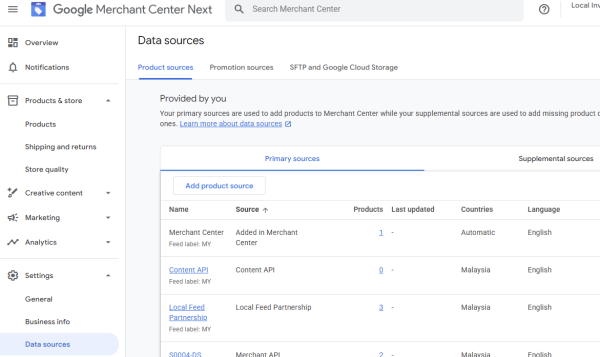
Before sending or updating an item from LS Central to Google, ensure that a Data source is available that you intent to use for store the products. Navigate to Settings - Data sources to access list of available Data Sources or to create new one.
Google Business Manager
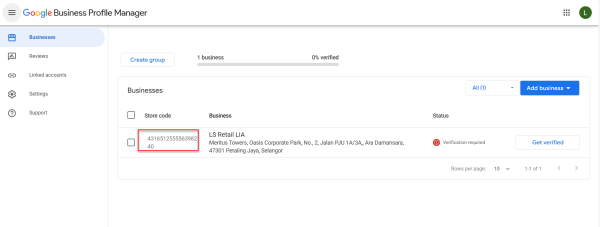
Google Store Code needs to be added to the LS Central setup to assign to LS Central Store code.
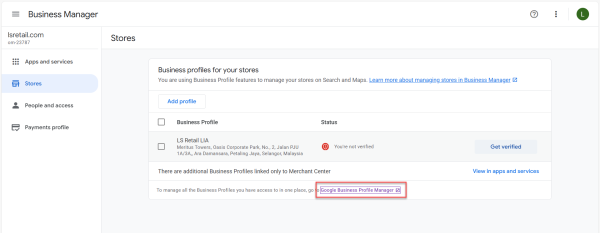
Google Business Manager site can be accessed from Merchant Center site by open Local Inventory Ads drop list and there is link Manage in Business Manager. In Business Manager site navigate to Stores and click on the link at the bottom to access Google Business Profile Manager where Stores can be found and Store Codes.