In this article
Order Submission to LS Central
The Tips (Gratuity) feature allows customers to add an optional tip during checkout for Hospitality orders placed through eCommerce.
Tips are displayed as configurable percentage-based suggestions during checkout, allowing you to select a predefined tip percentage or enter a custom amount.
The selected tip amount is included in the order and sent to LS Central as a separate order line.
Configurations
To enable tips feature, configurations have to be done at both LS Central and Magento.
Note: Only percentage-based tip suggestions are currently supported.
LS Central
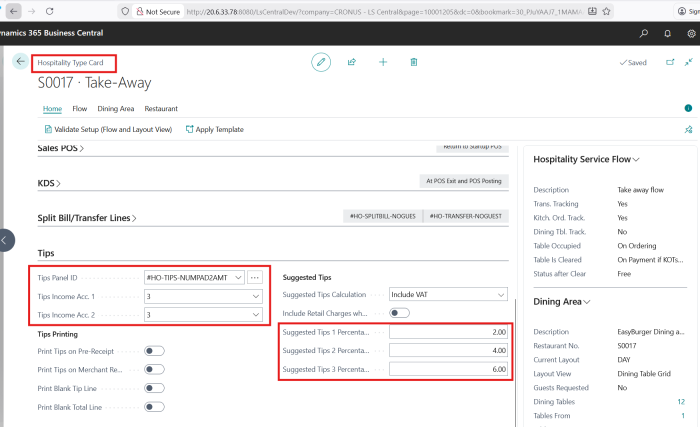
Under Hospitality Type Card, configure the highlighted values for tips to be activated for a specific hospitality store sales type.
If the tips value has to be configured in store level for all sales type, then you can configure the same values under corresponding Store Card.
Magento
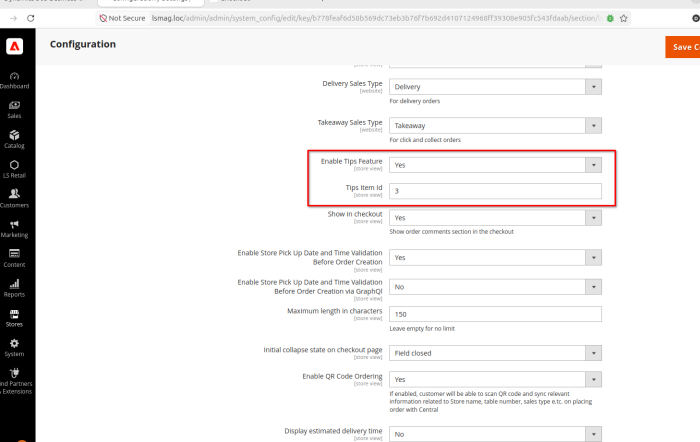
Magento got two configurations:
- Enable/Disable Tips feature
- ItemId for Tips line item in order create request.
Checkout Experience
Tip suggestions are displayed in the Order Summary section during the Payment step of checkout.
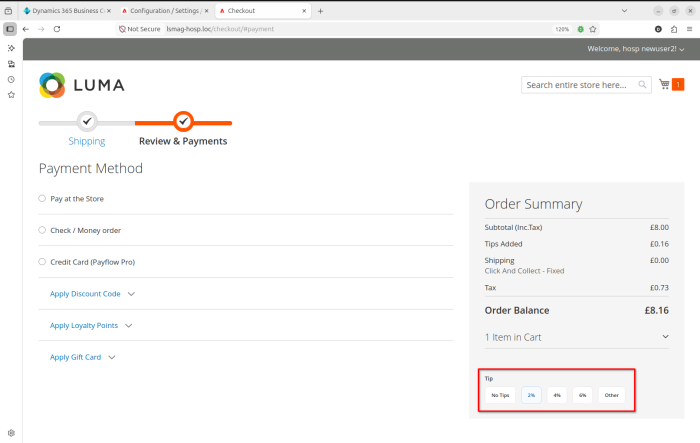
Customers can:
- Select one of the predefined tip percentages.
- Choose No Tip.
- Enter a custom tip amount.
After selection:
- The order total is updated automatically.
- The tip amount is shown in checkout totals.
- The selected value is stored with the order and send with OrderHospCreate request.
Order Submission to LS Central
When a customer submits the order, the tip is sent to LS Central as a separate Hospitality order line.
The tip line is created using:
| Property | Value |
| LineType | IncomeExpense |
| ItemId | 3 |
| Amount | Customer selected tip amount |