In this article
The hotel Night Audit is the process that summarizes the financial transactions that occur at the hotel's front desk each day.
Night Audit process
In a hotel’s business environment, guests check in and out at all hours and pay their bills through cash or cards. At the end of the business day, hotels need to record the guests' transactions.
The purpose of the Night Audit is to generate financial transactions for all accommodation that has occurred since Night Audit was last processed.
The Night Audit is normally scheduled at 2:00 AM, but can also be run manually using the Hotel Manual Job action.
The Night Audit includes the following steps:
- Ensures rollover from one business day to the next for every property in the Hotel system.
- Posts transactions to the finance according to a setting in Hotel Setup, see Accrual Accounting.
- Posts accommodation tax to the correct G/L Account, if it is not the same as the sales account.
- Logs error messages if the Night Audit did not finish correctly.
There are three options for the Night Audit, Accrual Accounting, Checkout Accounting and blank (night audit not used), and both are controlled by the Account Method option in the Night Audit FastTab in the Hotel Setup card.
1. Accrual Accounting
This is a financial accounting method that allows a company to record revenue before receiving payment for goods or services sold and record expenses as they are incurred.
In other words, the revenue earned and expenses incurred are entered into the company's journal, regardless of when money exchanges hands. Accrual accounting is usually compared to cash basis of accounting, which records revenue when the goods and services are actually paid for.
The Night Audit creates a General Journal and posts to finance for each hotel reservation that is In House or Checked Out, and Arrival Date is less or equal to Today, and Departure Date is greater or equal to Today. The General Journal is for all charges and there is one invoice per day. If payer number is a customer, the customer number is used as a customer for the General Journal transactions, otherwise the Night Audit Customer form in the Hotel Setup is used. In the case where the guest pays the charges, the Night Audit Customer is also used.
The transactions are posted debit to the Customer account and credit to sales and VAT accounts. At the time of payment the amount is posted debit to the Bank and credit to the Night Audit Temp Balance. The Night Audit finally balances out the Night Audit Temp Balance and the customer account, see example below.
For group reservations, all charges in the sub-reservations are collected into one transaction, if possible, and posted.
Posting example:

2. Checkout Accounting, Cash Basis Accounting
Businesses that use cash basis accounting recognize income and expenses only when money changes hands. They do not count sent invoices as income, or bills as expenses – until they have been settled.
The batch name of the General Journal is NIGHTAUDIT, and it must be posted to finance after the Night Audit Job has finished. It posts accommodation transactions debit to a Night Audit Customer account and credit to a Night Audit Temp Balance account. The Night Audit Temp Balance is the total sum for the Guest Ledger and is sometimes called Hotel Balance account. This is posted to the bank and to a sales account when customers settle their bill.
The night audit is posted on checkout.
No deposit consumption is done in the following example.
Posting example:

3. "Blank" Accounting
This account method does not rely on Night audit process to handle the financial postings. In this setup all the financial postings are made through the POS Statement process or the sales invoice process so users have more control of when everything is posted to the financial accounts.
Deposit handling in Night Audit
If there are prepaid deposits for a reservation, the deposit is consumed as much as possible for each day. It is posted debit to the Customer Prepayments account and credit to the Customer account.
The Night Audit processes Detailed Revenue Entry lines based on the reservation date and status. Only reservations with a status of In House or Checked Out are processed by the Night Audit. When processing the revenue lines it will check if there is deposit available to consume based on payer no./invoice type. So deposit for "Stefan" will only be consumed by revenue line set to payer No. "Stefan". It will continue consuming for each revenue line until either there are no more revenue lines left to process or until the deposit as been fully consumed.
The deposit consumption is posted to the Reservation Payment Entry table and the Deposit Consumed table, you can find this table from theHotel Invoice Management page - General Ledger List - Acions - Deposit Consumed. This Deposit consumed table will contain all consumptions the night audit has made.
Reversal of deposit consumption
Two cases automatically reopen previously consumed deposits on the next Night Audit run. Both apply in Accrual mode only — Blank Accounting does not run Night Audit and handles these cases through the POS Statement and Sales Invoice posting paths.
- Deposit refund posted on POS or in the Back Office. When a deposit refund entry exists, the next Night Audit run reverses the deposit consumption that the refunded deposit was funding. After the reversal the affected revenue lines become unpaid again and can be paid with a different tender or card.
- Routing rule changed on a reservation with consumed deposit. When a routing rule reassigns revenue lines to a different Invoice Type or Payer, the previous deposit consumption applied to those lines is reversed and a corresponding deposit refund entry is posted, so the deposit pool of the previous payer is restored and the new payer's pool is the one consulted on the next posting cycle. See Invoice Routing Rules.
Hotel General Ledger List page. For ease of viewing Night Audit data, the Night Audit sets the Hotel Reservation No., Folio No., and Detailed Revenue Entry Line No. in the General Journal and these fields are also in the G/L Entry table. This allows the user to filter on Reservation No. and drill down to the Detailed Revenue Entry.
- In the Hotel Reservation page, click Actions - Functions - General Ledger List. The Hotel General Ledge List opens, and here the Detail Trial Balance action filters on the Reservation No.
Membership Points. Membership Point Setup can calculate points based on Tender Type. Accrual Accounting must use this setup to the points since they are Income/Expense lines in the POS. The points are calculated based on amount.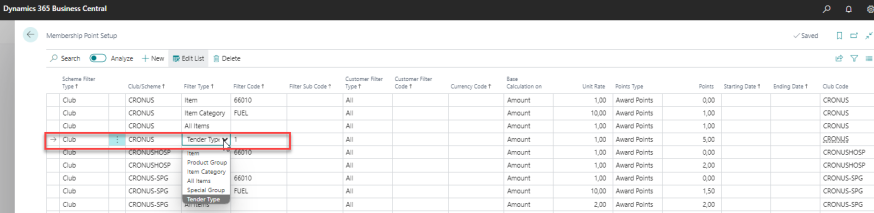
See also