Sometimes an environment can not get the new update. For example, a per-tenant extension might conflict with the changes in the latest version of the base application.
If an update fails, you should do the following:
-
Apply the changes needed to fix the problem to your solution as usual using Visual Studio Code.
-
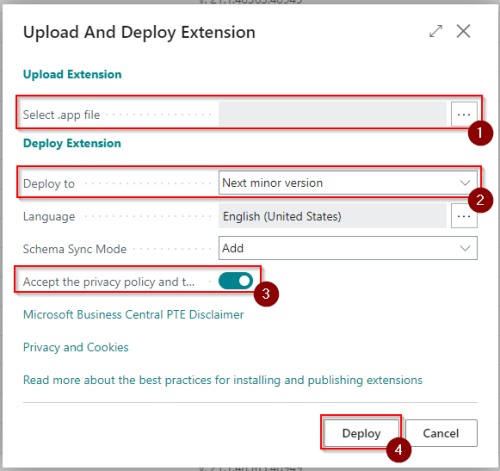
Upload the new app version to a sandbox environment dedicated for testing via the Extension Management page, and set the Deploy to field to Next minor version. This ensures that the compatible version of your app is used when the production environment is later updated, while all validation and testing activities are safely performed in the sandbox environment.
When an update fails, e-mail notifications that describe the detected issue are sent to all e-mails listed in the Notification Recipient list for the tenant.
The update is scheduled to run again within 7 days. You can update the scheduler date so that the update runs earlier to check if the issue has been fixed.
Important
You will receive a few attempts to take action on the failed upgrade, we will after that, have to take action.