In this article
Analytics for LS Central is a BI solution that gives you access to an extensive suite of data analysis power and reporting options for LS Central data, with none of the complications attached to building your own data warehouse.
Analytics is built by LS Retail on Power BI, which is Microsoft's Business Intelligence service in the cloud. When you use Analytics, you get access to reporting optimized data sets, and to all the Microsoft Power BI reports with their advanced calculations and relationships. It can be set up for LS Nav and LS Central on-premises from version 19.0 (possibly older but then not all report templates are supported) to the current versions, and for latest versions of LS Central SaaS.
When you have registered for a license, through the LS Retail License department, you can download the product package free of charge, to use as is, or as a base for your data warehouse and Business Intelligence environment.
For a more high-level description of the Analytics product or to request a demo, consult LSRetail.com .
After the release of Analytics (bc2adls based) we currently offer Analytics in two deployment models, depending on how data is sourced from LS Central.
Analytics (classic)
This version uses data sourced from:
-
LS Central on-premises, or
-
Pre-staging tables populated via Data Director and replication
This deployment model will continue to be supported for existing customers.

The Analytics for LS Central (classic) architecture consists of a few components that are shown in the image above and can be explained from left to right.
Business Central - LS Central
First, you have the LS Central source database. This is your LS Central BackOffice database and it can be located in Azure, on a virtual machine, or on an on-premises server.
If the LS Central database is on-premises, the Integration runtime management gateway needs to be set up on a machine that is always running.
If LS Central is running as SaaS, an extra step is needed in the loading of the data from LS Central to Analytics. The Azure Data Factory v.2 contains all the pipelines that collect and load the data from LS Central into the data warehouse.
Azure SQL Server - Data warehouse
The data warehouse dimension and fact tables, designed in a star schema, are stored in the Analytics SQL database.
Power BI service - Data model and reports
With the Analytics setup you get the Power BI templates containing the data models and reports .
Analytics (bc2adls-based)
This newer version uses data exported from LS Central SaaS via the bc2adls app to Azure Data Lake Storage.
It is designed to better support:
-
LS Central SaaS environments
-
Modern Azure and Fabric-based Analytics scenarios
-
Ongoing improvements to the data warehouse and reports
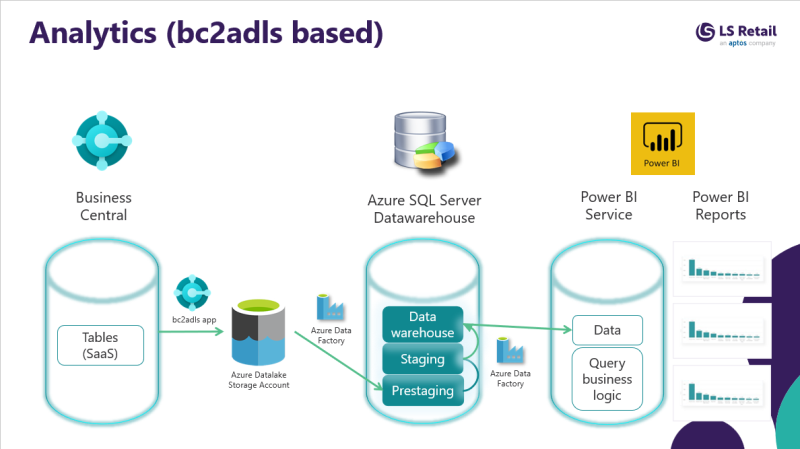
The Analytics for LS Central (bc2adls based) architecture consists of a few components that are shown in the image above and can be explained from left to right.
Business Central - LS Central
First, you have the LS Central source database. This is your LS Central BackOffice database in SaaS.
bc2adls app is used to export the data from LS Central to Azure storage account and from there it read by the Analytics. The Azure Data Factory (ADF) pipelines. The Analytics ADF contains all the pipelines that collect and load the data from the storage account into the data warehouse.
Azure SQL Server - Data warehouse
The data warehouse dimension and fact tables, designed in a star schema, are stored in the Analytics SQL database.
Power BI service - Data model and reports
With the Analytics setup you get the Power BI templates containing the data models and reports .
Setup and onboarding
The
Analytics for LS Central
setup and running of
Analytics for LS Central
is explained in the
onboarding process
.
Recommended knowledge:
While not mandatory, a basic understanding of
SQL,
Power BI, and
Microsoft Azure is highly recommended to get the most
value from Analytics. You can build these skills using
Microsoft Learn:
-
SQL (Transact‑SQL querying): https://learn.microsoft.com/en-us/training/paths/get-started-querying-with-transact-sql/
-
Power BI: https://learn.microsoft.com/en-us/training/powerplatform/power-bi
-
Azure data and integration (pipelines, triggers, data movement): https://learn.microsoft.com/en-us/azure/data-factory/